A restaurant menu QR code should open a fast, readable web page for the right location, service period and language, and the work that matters is building and operating that page. The code is only the link. Prices, availability, dietary information and ordering instructions have to stay accurate, and guests who cannot or do not want to scan need an equal alternative.
This guide is about the menu page itself: which format to publish, how to structure the address, what the page needs to contain, how to keep it quick, how search engines find it, and how to run daily updates without surprises. For choosing which codes a dining room needs (menu, Wi-Fi, reviews, payment) and where to place them, see the restaurant QR code guide. For allergen information, which is its own regulated topic, see food allergen QR codes.
Which format should the menu page use?
A responsive HTML page is the default for most restaurants. W3C's WCAG 2.2 reflow criterion expects content to fit a narrow viewport without side-to-side scrolling, which is hard for an image or a fixed-layout PDF on a phone.
| Destination | Best use | Main limitation |
|---|---|---|
| Responsive HTML menu | Primary menu for most restaurants | Requires maintained web content |
| Accessible PDF | Downloadable or print-equivalent supplement | Often difficult on small screens if not properly authored |
| Online ordering page | Selection, cart, payment or pickup workflow | More privacy, payment, availability and support duties |
| Location landing page | Multiple menus, languages, hours or service periods | Adds a choice before the menu |
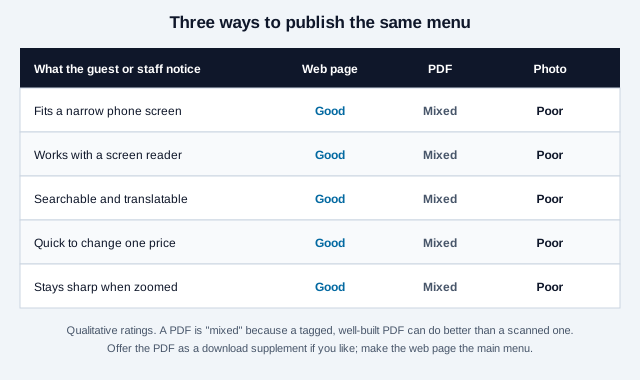
If you must use a PDF, vendor guidance (QRStuff, a QR software company) suggests hosting it on your own domain, keeping it to roughly 2 to 3 MB, and opening it in the browser instead of forcing a download. Treat those figures as a rule of thumb from a vendor, not a standard. The PDF QR code guide covers the file side.
How should the menu address be structured?
Encode a short, permanent address on a domain you control, such as yourrestaurant.com/menu, and let that page decide what to show. Then the printed code outlives a website redesign, a new builder or a switch from PDF to HTML.
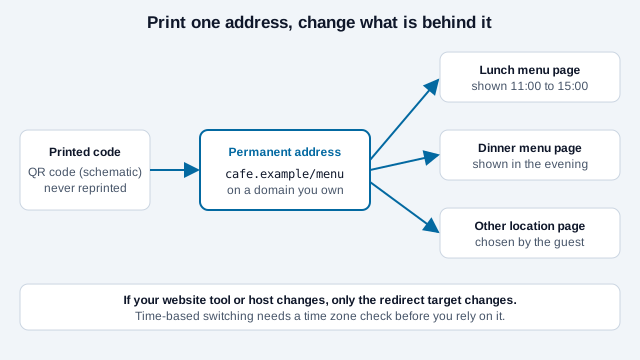
- One address per location when prices, availability, legal statements or preparation practices differ. A single national code that silently guesses the venue can show the wrong menu, so give guests an explicit choice or print a location-specific code.
- Service periods can be separate pages or sections. Time-based switching depends on server time zone and clock settings, so test it before relying on it.
- Languages work best as a visible switch at the top of the page, with the page language declared so screen readers pronounce it correctly.
A static code never expires and costs nothing to keep, which suits this setup: you edit the page, not the code. A dynamic code helps only if you cannot control the redirect on your own domain; it adds a redirect service you depend on. The static vs dynamic guide compares the two.
What does the menu page need to contain?
Design for a phone held in one hand under restaurant lighting. Vendor guidance suggests body text of at least 16px, large tap targets and a layout designed for phones rather than adapted from a letter-size printout. The wireframe below shows the parts that earn their place.
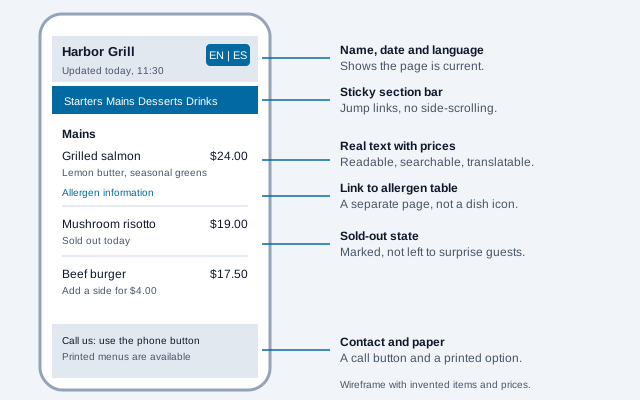
- Restaurant name, location and a visible last-updated time.
- A sticky section bar with jump links such as
/menu#drinks, which keeps the page one fast load instead of many. - Item names, short descriptions and prices as real text. State currency, and say whether taxes or service charges are included.
- A sold-out state that is visible, not hidden, so guests do not order something that no longer exists.
- A link to the allergen table and dietary notes, and a line telling guests with serious allergies to speak to staff.
- A call or message option and a note that printed menus are available.
Do not require an account, phone number, email address, app install or location permission just to read prices. Keep essential menu access outside marketing sign-up walls. If you add ordering, keep it a separate step the guest chooses.
How do you keep the page fast and readable?
Test on mobile data, not office Wi-Fi, because guests may be in a basement dining room with one bar of signal. Compress photos, avoid auto-playing media, avoid pop-ups, and keep the first view usable without scripts that block rendering. Some vendors recommend scoring 80 or more on PageSpeed Insights mobile; that is a vendor target, so use it as a prompt to measure rather than a rule.
Accessibility is part of speed in practice. Real headings and lists, sufficient contrast, labelled buttons and keyboard access help everyone, and lawsuits that allege inaccessible restaurant ordering sites and apps have been reported in the US (they are allegations, and outcomes vary). The QR code accessibility guide and the contrast checker help you check the print and screen sides.
How do search engines and map listings find the menu?
A menu page on your own domain can be linked from your website and your Google Business Profile, which accepts a menu link as well as individual items in its Menu section according to vendor how-to guides. Whether that link improves local ranking is claimed by vendors but not confirmed in the Google documentation reviewed here, so do not promise a ranking effect.
The schema.org vocabulary has a hasMenu property for restaurants that accepts a URL, text or a structured menu. Pointing it at your menu page is a low-risk addition, but Google's own pages on whether menu rich results are shown were not reviewed, so check Search Central before expecting them. Google also describes a separate partner feed for menu data in its Reservations documentation, which is not the same as on-page markup.
Where do ordering and payment fit?
A menu displays information. An ordering system adds availability, modifiers, cart rules, table or pickup identity, taxes, payment, confirmation, refunds, security and support. Do not encode a raw table number in a way that lets a guest edit the URL and order for another table without server-side validation. Keep customer and payment data out of the QR payload, use a reputable hosted checkout, and show the official domain before payment. The QR code payments guide covers the payment side.
Which rules touch the menu itself?
Do not infer "allergen-free," "gluten-free," vegan, halal or kosher claims from a recipe name or icon, because suppliers, shared equipment and preparation can change. Connect updates to your controlled recipe and food-safety process.
FDA's federal menu-labeling rule applies to restaurants and similar retail food establishments that are part of a chain of 20 or more locations doing business under the same name, and requires calories next to standard items on menus and menu boards plus written nutrition information on request. No source reviewed for this guide says how the rule treats QR or digital menus, so a chain should confirm with FDA guidance or counsel before assuming a QR page satisfies it. Smaller venues should check state and local rules. A QR code does not waive any required menu, board, notice or written information.
How do you run the page day to day?
Assign an owner for opening, mid-service and closing checks, record who may change prices and dietary details, and keep a short change log. The cycle below keeps a stale cached page from advertising an item that sold out an hour ago.
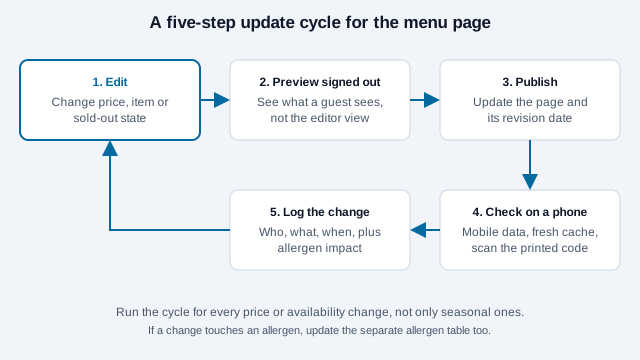
Set sensible cache controls, then test from a guest phone, not from the editor session where you are logged in. When an item sells out, mark it consistently on both the menu and any ordering system.
What about printing, tamper risk and outdoor service?
Label the code with a purpose such as "Scan to view the menu", the restaurant name and a short typed address. Test the finished table tent at the distance and lighting where guests sit; the scannability tester and the print size guide help. The FBI has warned that malicious QR codes can send people to pages seeking personal and financial information, so print the official domain beside the symbol, use mounting that makes overlays visible and inspect before each service. The quishing guide explains the attack.
Food trucks and outdoor stalls add glare, wind, rain and weak signal. Use a rigid matte sign, keep essential items and prices visible without scanning, and carry a printed menu in case connectivity fails.
How does a menu code go wrong at the table?
Look at a bistro that exports its printed menu to a PDF, uploads it to a free file-sharing service and prints the long share link as a QR code on every table. Months later the free plan lapses, the link starts showing an error page, and the owner reprints forty table tents on a Saturday. A second problem was already hiding: guests had to pinch and drag across a letter-sized layout, and a blind guest's screen reader read nothing.
The fix is a menu page at bistro.example/menu, a code that points to that address once, and a PDF kept only as a download for those who want it.
Menu page checklist
- The address is public, HTTPS, short, stable and controlled by the business.
- Location, hours, prices, currency, charges and availability are current, with a visible update time.
- Text is real text, reflows on narrow screens and works with keyboard and assistive technology.
- The page loads quickly on mobile data and does not ask for sign-up to read the menu.
- An allergen link and a "speak to staff" line are present, and dietary claims follow an approved process.
- Ordering and payment are separate steps on a reputable domain.
- A printed or staff-read menu is available without delay.
- An owner, an update routine and a change log exist.
- Printed codes carry a label and are inspected for overlays.
Which menu rules depend on your location?
Three things cannot be settled here: whether your jurisdiction treats a QR menu as satisfying required menu notices, how your chosen website builder handles caching and redirects, and whether structured-data markup will earn any search display for your site. Check each against your local authority and your own site's behavior.
This article is general information, not legal advice. Food-labeling, accessibility and privacy rules differ by country and locality and change over time, so confirm what applies to your venue with your food-safety authority or a qualified adviser.
References
- W3C WAI: reflow (WCAG 2.2)
- W3C WAI: accessible design tips
- FDA: menu-labeling requirements
- FDA: food allergies
- QRStuff (vendor): how to publish your restaurant menu online
- schema.org: hasMenu
- Google for Developers: add menus (Reservations partner documentation)
- Modern Restaurant Management: website accessibility lawsuits and ADA compliance
- DENSO WAVE: QR Code area and quiet zone
- FBI IC3: cybercriminals tampering with QR codes to steal victim funds (January 2022)