Choose a QR Code when people need to scan from a visible distance, the design will be printed at scale, or broad phone compatibility matters. Choose NFC when a deliberate close-range tap, concealed tag, or supported chip-level security feature improves the workflow. Many products benefit from using both.
Neither carrier is automatically dynamic, private, or secure. A printed QR Code and an NFC tag can each contain a fixed URL; changing its destination later requires a redirect or another managed backend. Judge the complete system, not only the label.
QR Code vs NFC at a glance
| Factor | QR Code | NFC tag |
|---|---|---|
| How it is read | Camera decodes a visible two-dimensional symbol | Compatible device exchanges data over short-range radio |
| Typical interaction | Point and scan from a distance suited to the printed size | Bring the phone within a few centimeters |
| Physical component | Printed or displayed graphic | Chip and antenna in an inlay, card, or rugged tag |
| Lighting | Needs enough light and visual contrast | Does not depend on seeing the tag |
| Metal and placement | Surface must remain visible and undamaged | Material and antenna placement affect performance; metal often needs a suitable on-metal design |
| Copying | A visible payload can be photographed and reproduced | Basic tags can also be copied; some chips support authentication features |
| Deployment cost | Usually part of existing print or display production | Adds a tag, encoding, placement, and quality-control process |
| Fallback | Can be accompanied by a readable URL | Needs printed instructions or another carrier for unsupported devices |
How the technologies work
A standard QR Code is an optical matrix defined by ISO/IEC 18004. A camera sees its modules, finder patterns, timing information, and encoded data. Print size, viewing distance, focus, contrast, glare, damage, quiet zone, and payload density all affect whether it scans.
NFC is a family of short-range technologies operating at 13.56 MHz. Android describes connections as typically requiring 4 cm or less. A phone can energize a passive tag and read a small payload, commonly an NFC Data Exchange Format (NDEF) message. Actual performance depends on the phone, antenna, tag, surrounding material, orientation, software, and use case.
Do not promise a universal QR scanning distance or NFC tap time. Test the chosen symbol or tag in the final object with representative devices.
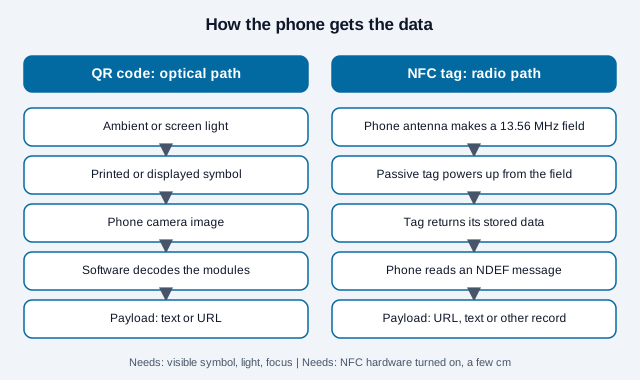
One practical consequence: a QR code can be shown on a screen, a poster or a delivery van, and read by anyone who can see it. An NFC tag has no signal of its own. It answers only when a reader's field reaches it, so it needs a visible cue telling people where to tap.
Compatibility and user experience
QR scanning is built into many current phone camera experiences, but camera condition, operating system, policy restrictions, accessibility needs, and user familiarity vary. NFC also requires supported and enabled hardware. Android tells developers to detect NFC capability, while Apple documents both in-app and background tag reading on supported devices and notes conditions where background reading is unavailable.
On iPhone, Apple's documentation says background tag reading is available on iPhone XS and later, only while the phone is in use, and that it does not support custom URL schemes, so use ordinary https links. Background reading also pauses in some states, such as when a camera is in use, in airplane mode, or after a restart until the phone is unlocked once. Apple advises offering a way to read tags from within an app because not every device supports background reading. Plan for some people needing to open a reader or simply scan the printed QR code instead.
Give people a clear instruction: “Scan for the menu” or “Tap for product details.” Show a readable destination or equivalent route when the action matters. A hybrid label should not make users guess whether to tap the printed square or scan it.
What makes each one fail in the real world?
Lab specifications say little about a bus shelter or a metal toolbox. Optical codes fail for optical reasons: glare, too little contrast, a symbol too small for the viewing distance, or a surface that creases. NFC tags fail for radio reasons. Metal near the antenna detunes a standard tag, so suppliers sell on-metal tags that add a ferrite layer; one maker notes such tags can read slightly shorter in exchange for working on metal at all, and another says larger on-metal sizes perform better but cost more. Cases, wallets and liquids can also reduce reads.
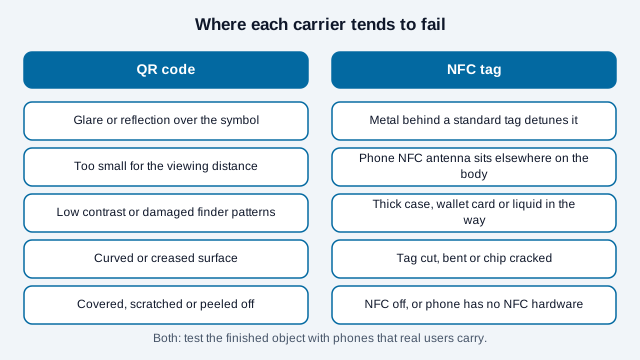
Neither list is exhaustive, and these are qualitative patterns, not measured failure rates. The remedy is the same for both: put the real object in a real phone user's hand before ordering a run.
Cost: compare the deployed system
A QR Code normally uses space and ink within an existing print job. NFC requires a chip and antenna plus sourcing, encoding, insertion or attachment, testing, inventory control, and possible replacement. Prices change by volume, memory, security capability, antenna design, substrate, environmental rating, and supplier, so a universal cents-per-tag comparison quickly becomes misleading.
Request quotes against the real bill of materials and include:
- artwork, tag, encoding, personalization, and installation;
- quality assurance and failed-unit replacement;
- redirect, platform, analytics, and domain costs;
- support, accessibility, and non-phone alternatives; and
- changes, recalls, expiry, and end-of-life handling.
Capacity and destination management
QR capacity varies by version, error correction, and data mode. The theoretical byte-mode maximum is 2,953 bytes for Version 40 at Level L, although practical public codes should usually carry a short URL.
NFC capacity depends on the specific tag. For example, NXP lists 144, 504, and 888 bytes of user memory for NTAG213, NTAG215, and NTAG216. NDEF formatting consumes some space, so select a tag only after encoding the exact payload. A short HTTPS URL is usually easier to maintain than embedding large text in either carrier.
Imagine a 60-character https address with a short tracking path. Encoded as an NFC Data Exchange Format record, it plus the record header would still fit inside the 144 bytes NXP lists for NTAG213, but a long campaign URL with many parameters could crowd it, which is when a short redirect address earns its keep. As a QR code, the same address is a tiny symbol; a longer URL only makes the pattern denser and harder to scan at small sizes.
A writable tag is not the same as a managed dynamic link. If field staff can rewrite a tag, define authorization, locking, audit, and recovery. If both carriers use a redirect, own the domain and document what happens when a vendor contract ends.
Security: NFC is not automatically clone-proof
Basic QR Codes and basic NFC tags can expose copyable identifiers or URLs. Android's documentation distinguishes simple read/write tags from more complex tags with cryptographic hardware. Security therefore depends on the selected component and the application behind it.
Some secure NFC chips can calculate authentication values that a backend verifies, but successful deployment also needs protected keys, freshness or replay controls, correct verification, controlled personalization, monitoring, and exception handling. An ordinary tag UID, password-protected write area, or vendor originality signature does not by itself prove that a product is genuine.
NXP describes its NTAG 424 DNA family as generating a fresh, verifiable message on every read, using AES-128 and a counter that increments on each tap; a server checks the message. Reseller pages call such tags unclonable, which is a marketing claim. The protection exists only when the verifying server actually checks the counter and rejects repeats. A tag that passes a weak check is still copyable.
QR workflows can also use digitally signed payloads or server-side identifiers, but a copied static symbol will still point to the same value unless the system detects or limits reuse. For either carrier:
- minimize exposed data and never embed secrets;
- use HTTPS and a domain the organization controls;
- inspect labels for overlays, swaps, or physical damage;
- authenticate consequential actions inside the service; and
- define revocation, incident response, and offline behavior.
When a QR Code is the better fit
- Posters and signs: people can scan without touching the object.
- High-volume print: no electronic component must be inserted into each unit.
- Screens and broadcasts: the symbol can be displayed electronically.
- Shared access: several people can see and scan the same code.
- Visible fallback: the destination and purpose can be printed beside it.
When NFC is the better fit
- Close, intentional interaction: the user taps a specific object.
- Low-light use: optical visibility is poor.
- Concealed integration: a correctly designed tag can sit behind a non-metallic surface.
- Supported secure applications: the selected chip and backend provide required authentication features.
- Repeated operational reading: a validated app and tag design suit a controlled workflow.
NFC is not a substitute for a certified access credential or payment system merely because both use contactless technology. Those applications have additional protocols, hardware, certification, and risk controls.
When to combine QR and NFC
A dual-carrier label can offer tap convenience while retaining a visual route for people without compatible NFC hardware. Point both to the same governed destination unless channel-specific measurement serves a documented purpose. If the links differ, keep their content, privacy notices, and lifecycle behavior aligned.
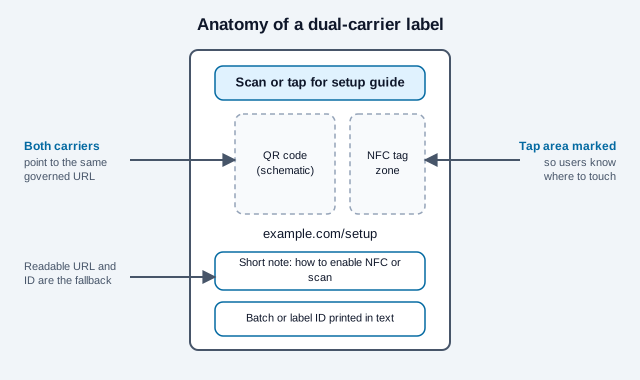
Prototype before ordering at scale. Test QR contrast and size, NFC antenna performance in the final material, phone compatibility, landing-page speed, accessibility, analytics, tamper resistance, and the fallback route.
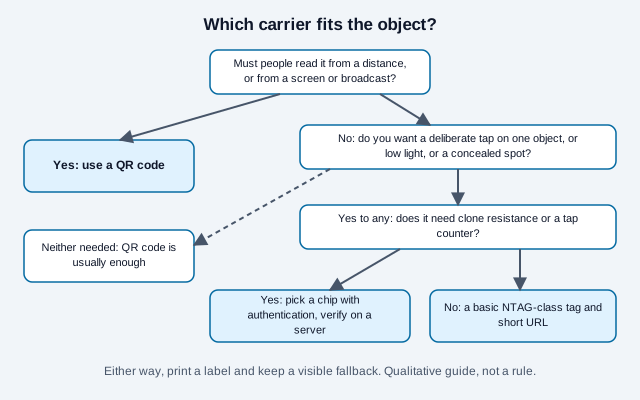
What mistakes do teams make with these two?
Consider a small skincare brand that orders 5,000 boxes with an NFC tag under each lid, printed with no visible cue. At launch, half of testers never touch the box with the phone, a few owners of older phones find nothing happens, and the foil sleeve on one pack variant blocks the reads. The brand adds a printed QR code beside the tap mark and a short line of text. Two things would have caught this earlier: a ten-box pilot on the finished packaging, and a plan for what happens when the tap fails.
- Shipping a tag with no printed instruction or tap mark.
- Putting a standard tag on or near metal without testing.
- Treating a copyable tag identifier as proof that the product is genuine.
- Writing a long URL into a small tag, then needing to change the destination later.
- Pointing the QR code and the tag at different pages with different privacy notices.
For authenticity workflows, the product authentication guide covers what a signed or serialized code can and cannot prove, and can QR codes be hacked covers the optical side.
Decision checklist
- Define the user action, environment, distance, and accessibility needs.
- Decide whether a visible symbol, close tap, or both fits that action.
- Price the complete deployed and maintained system.
- Select payload capacity and security features from actual product documentation.
- Keep the destination under organizational control.
- Test production samples on representative devices and materials.
- Assign ownership for inspection, updates, incidents, and retirement.
If QR is the right carrier, create the QR code with the final tested URL and use the print-size guide before production. If the destination may change after printing, read static vs dynamic QR codes, and set error correction to suit the surface. To compare how each channel performs, tag the URLs as described in the QR code tracking guide.
Open questions this page cannot settle: real tap success rates vary by phone model and case, which no public benchmark covers here, and tag prices change by supplier and volume. Get supplier quotes and run your own pilot. This is general information, not procurement or security advice.
References
- ISO/IEC 18004:2024, QR code bar code symbology specification
- Android Developers: Near field communication overview
- Apple Developer: NFC interaction guidance
- Apple Developer: Core NFC documentation
- Apple Developer: Adding support for background tag reading
- NFC Forum: iPhone background NFC tag reading coverage
- NXP: NTAG213, NTAG215, and NTAG216 specifications
- NXP launch coverage: NTAG 424 DNA secure unique NFC message
- Avery Dennison: Block On-Metal NFC tags
- RFID Journal: flexible on-metal NFC tags