At a yard sale, use QR Codes for two narrow jobs: opening an official payment flow at the checkout table or opening a public listing with item details. Label every code, verify the destination before displaying it, and confirm each payment inside your own official payment app or account before releasing an item.
A QR Code makes a link easier to open; it does not guarantee payment, buyer identity, seller protection, or a safe meetup. Cash, platform rules, fees, taxes, recalls, and local sale requirements still apply. This guide covers which code fits which goal, how to set up a payment code, the fake-payment tricks to watch for, how to protect your address, and a day-of timeline.
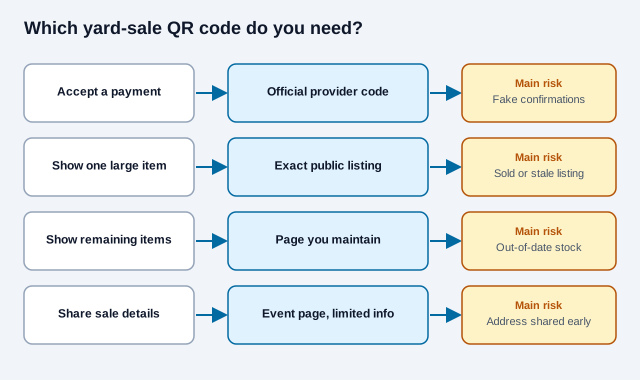
Which yard-sale QR Code do you need?
| Goal | Recommended destination | Main risk |
|---|---|---|
| Accept an in-person digital payment | Official provider-generated seller or payment QR Code | Fake confirmations, wrong recipient, fees, disputes |
| Show details for one large item | Exact public marketplace listing | Expired listing, privacy exposure, impersonation |
| Show a catalog of remaining items | Mobile page you maintain | Stale availability and excessive personal data |
| Share the sale location or hours | Public event page with limited details | Publishing a home address too early or too widely |
How do you set up a payment QR Code safely?
- Choose a payment service available in your country and read its current rules for selling goods.
- Use the appropriate seller, business, goods-and-services, or in-person payment option where required.
- Create or download the QR Code from the provider's authenticated app or website.
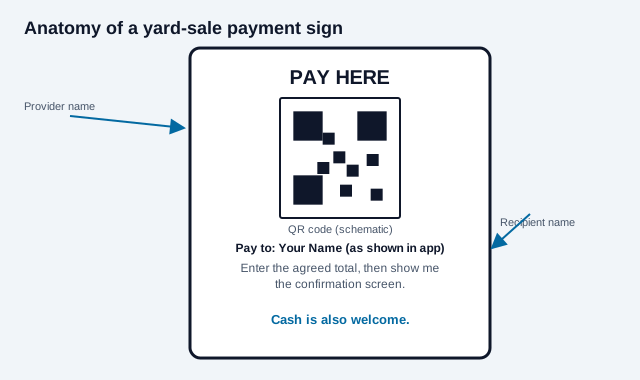
- Confirm the displayed account name is the name buyers should expect.
- Test a small transaction with a trusted person and inspect the complete seller-side record.
- Print the code with the provider name, recipient name, and the instruction "Enter the agreed total."
- At checkout, compare the amount and status in your own official app before handing over goods.
PayPal, for example, provides an in-app process for displaying or saving a personal QR Code and a separate business QR offering. Its pages also state that protection has eligibility limits. Other services have their own account categories, fees, dispute terms, and restricted-item policies. Do not assume that a generic profile link receives the same treatment as an official seller transaction. For a fuller look at taking payments through codes, see how to accept QR code payments.
Why is a payment screenshot not proof of payment?
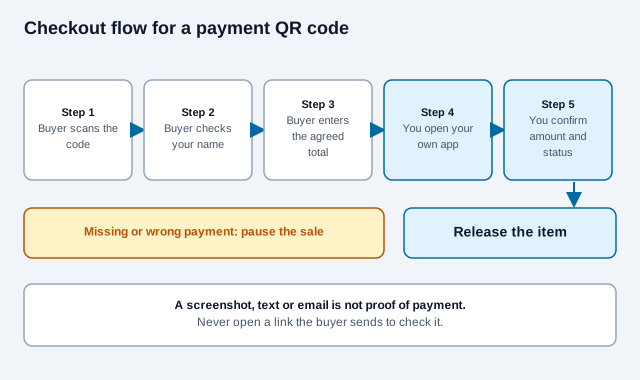
A buyer's screen, text message, or email is not proof that money reached your account. The FTC describes buyers who push a seller toward a mobile payment app and then show a fake payment notification, or who claim to have overpaid and ask for the difference back. Meta likewise advises sellers to check their own account and not rely on screenshots. The FTC's advice for local sales is to meet the buyer in person and accept only cash when you can, and not to accept mobile payments from people you do not know.
Use this checkout rule:
- The buyer confirms the recipient name before sending.
- You open the official app yourself; never a link supplied by the buyer.
- You find the transaction in your activity and confirm the exact amount and status.
- You release the item only after that confirmation.
Do not pay a fee to "upgrade" an account in order to receive a buyer's money. Do not refund an alleged overpayment until you independently verify the original transaction and use the provider's supported refund process. The FTC also warns about buyers who ask for a verification code, such as a Google Voice code, to set up a number in your name. Never share a password, PIN, one-time code, or account-recovery code. Never deposit a check for more than the selling price.
What if someone swaps your payment code?
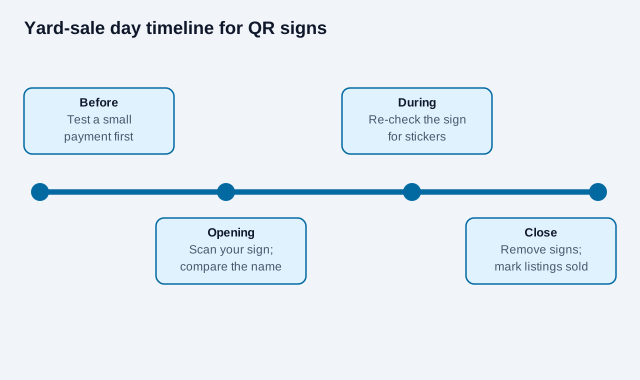
The FBI has warned that criminals replace or tamper with QR codes, including fake codes placed on payment requests to redirect money. At a yard sale the risk is a sticker over your sign. Place one verified payment sign where sellers can supervise it. Multiple unattended copies make it harder to notice a replaced sticker or a code covered by someone else's payment code. At the start of the sale and periodically during it, scan the displayed code and compare the destination and recipient name.
Keep cash as an option when practical. Some buyers will not have the required app, data connection, account, or accessible device. A QR-only checkout can exclude them and may fail during a service or network outage.
How do you create a QR Code for a Marketplace listing?
- Publish the item on the marketplace and follow its current commerce rules.
- Remove unnecessary personal information from photos and description.
- Copy the exact public responder URL, not an editing, draft, or account-management link.
- Open it in a signed-out private browser window to see what a stranger sees.
- Use the URL QR Code generator to encode that tested public link.
- Label the code "Scan for item photos and details" and print a short fallback URL where feasible.
- Remove the sign and mark the listing sold as soon as the item is unavailable.
Never encourage someone to scan while driving. Position the code where a pedestrian can stop safely, or let an interested driver park before viewing it. The main sign should still show essential information such as item type and price so scanning is optional. The QR codes on posters guide covers sign placement and reading distance.
How do you protect your address and personal information?
A public QR Code can be photographed, decoded, indexed, and shared beyond the sale. Do not place private contact data, access codes, financial information, children's details, or an unlisted home schedule directly in the symbol.
For local marketplace meetups, Meta recommends a public, well-lit place and sharing the plan with another person. A yard sale necessarily reveals its location during operating hours, but you can limit exposure: publish the exact address close to the event, remove posts afterward, keep doors and private areas secured, have another adult present, and avoid telling strangers when the property will be empty.
What product and listing checks apply?
A QR Code does not make an item lawful to sell. Check marketplace rules and local law before listing regulated, recalled, counterfeit, hazardous, age-restricted, medical, or safety-sensitive products. The US Consumer Product Safety Commission (CPSC) posts recall notices and, on some of its warnings, tells consumers not to sell or give away the product. Coverage of the federal rules on reselling recalled items describes them as covering secondhand sales, and also reports that the CPSC said it was not seeking penalties against individuals holding yard sales. That coverage dates from 2009, so check the current rules with the CPSC. Remove personal data from phones, computers, drives, smart-home devices, and printed records before offering them.
Describe condition accurately. For high-value goods, allow the buyer to inspect the item safely before payment. Do not accept a courier, mover, or relative story as a reason to overpay, send money back, reveal a verification code, or move immediately to an unfamiliar channel.
What is the print and display checklist?
- Use dark modules on a light, non-reflective background.
- Preserve the four-module quiet zone around the code, as DENSO WAVE specifies.
- Print from SVG for a sign or use a sufficiently large PNG.
- Keep the code flat, clean, dry, and away from folds or staples.
- State the destination and action in nearby text.
- Show the expected recipient name for payment codes.
- Test the final print with representative phones at the real distance.
- Inspect supervised payment signs for sticker tampering.
- Remove every public sign and listing when the sale ends.
There is no universal print size that guarantees scanning. Size depends on module density, camera, contrast, viewing distance, lighting, and print quality. Use the QR Code print-size guide, then validate the actual sign with the scannability tester instead of relying on a ratio alone.
What is a simple checkout script?
Consistency prevents rushed mistakes. Tell the buyer: "Please confirm my displayed name, enter the agreed total, and show me when you have submitted it. I will verify it in my account." Then check the transaction yourself. If the payment is missing, pending, sent to the wrong account, or accompanied by an unexpected request, pause the sale rather than improvising.
How does a yard sale code go wrong?
Picture a seller who puts three copies of a payment sign on the fence, the table and the garage door, and leaves one unattended. Midmorning a stranger sticks a lookalike code over the fence copy. A buyer pays the stranger's account, shows a confirmation screen, and the seller, busy with a second customer, glances at it and hands over a bike. The money never arrives. This is an illustration, not a real case, but every step is a known pattern: unattended signs, a swapped code, and a screenshot accepted as proof. One supervised sign and a check in the seller's own app would have caught it.
What are the ground rules for yard-sale codes?
- Use an official provider-generated payment code and verify every payment in your own account.
- Never accept a screenshot, email, or text notification as proof of settlement.
- Link listing codes to the exact public page and remove them when the item sells.
- Supervise payment signs, limit exposed personal information, and keep a non-QR option available.
Once the destination has been checked in a signed-out browser, create the QR code, label its purpose clearly, and test the finished sign before the sale opens. For more on spotting tampered codes, read the QR safety guide.
What depends on your town and your buyers?
Payment providers change their fees, seller protections and account rules, and some jurisdictions require permits for sales or treat repeated selling as a business. Tax treatment of secondhand sales also varies. Check your provider's current terms, your local sale and permit rules, and a qualified adviser for tax questions. This guide is general information, not legal, tax or financial advice.
References
- FTC: avoiding scams when selling online
- FTC: using mobile payment apps safely
- FBI IC3: cybercriminals tampering with QR codes (January 2022)
- US Consumer Product Safety Commission: recalls
- Meta: scams on Facebook Marketplace
- Meta: Marketplace in-person meeting safety
- PayPal: QR payment instructions
- DENSO WAVE: QR Code area and quiet zone