A QR Code scavenger hunt uses labeled codes at planned stations to open clues, questions, media, or tasks on participants' phones. A reliable hunt needs more than generated images: every destination must be published with the right access settings, each location must be safe, and participants need a non-QR alternative.
For a simple no-code version, use public web pages or carefully configured forms, create one tested URL QR Code per station, and run a complete dress rehearsal on an account and device that did not create the content.
The guide below covers hunt structures, planning the route, a no-code Google Forms setup, why answer checking is not a lock, labeling stations, accessibility, privacy for children and employees, tamper checks, and a dress rehearsal.
Which hunt structure fits your group?
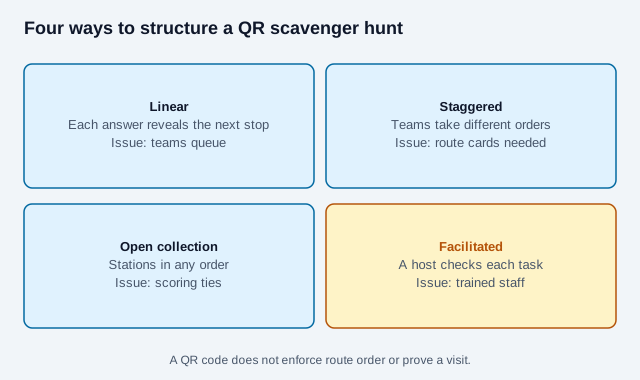
| Structure | How it works | Best use | Operational issue |
|---|---|---|---|
| Linear | Each answer reveals the next location | Small groups and story-led hunts | Teams can queue or follow one another |
| Staggered routes | Teams visit the same stations in different orders | Classes and workplace events | Route cards and reset rules are needed |
| Open collection | Stations can be completed in any order | Museums, fairs, and conferences | Scoring and tie-breaking need definition |
| Facilitated | A host validates tasks at stations | Young children or safety-sensitive activities | Requires trained staff |
A QR Code does not enforce the route, prove that a participant visited a place, or prevent answer sharing. Design for the desired social experience instead of treating the code as an anti-cheating system.
What should you plan before generating any codes?
- Define the audience, learning or event objective, team size, duration, and boundaries.
- Walk the proposed route and remove traffic, water, stairs, restricted-area, crowd, and weather hazards.
- Choose staffed checkpoints for minors or public locations that require supervision.
- Write each clue, accepted answer, hint, next step, and fallback on a master station sheet.
- Decide what participant data is genuinely necessary; anonymous play often needs none.
- Create a reset and cancellation plan for missing signs, broken links, unsafe conditions, or network failure.
Do not hide codes where participants must climb, enter roads, trespass, move safety equipment, open private containers, or photograph bystanders. Get permission before attaching signs to property. Do not reveal children's live locations on a public page.
How do you build a simple Google Forms hunt?
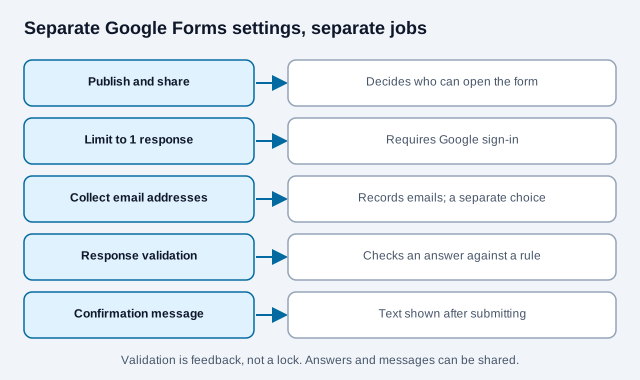
Google Forms can collect answers and show a confirmation message, but its settings are separate. Publishing a form, choosing who can respond, collecting email addresses, limiting responses, validating an answer, and customizing the confirmation message are different controls.
- Create a form or quiz for the station and give it a plain-language title.
- Add the clue, task, or question with clear instructions and an expected answer format.
- For a supported question type, use response validation and write a useful error message.
- If the next clue belongs in the confirmation message, configure and test that message.
- Publish the form and grant responder access to the intended audience.
- Choose whether sign-in, one-response limits, or email collection are truly required.
- Copy the responder link, not the editor link.
- Open it in a private browser or a participant account before encoding it.
Google notes that limiting a form to one response requires sign-in, while usernames are not recorded unless email collection is enabled. That trade-off matters in a public, family, or school hunt. Do not collect verified email addresses merely to discourage repeat attempts.
Is response validation a secure lock?
Validation can give feedback when an answer does not match a rule, but it is not suitable for secrets, exam security, prizes of significant value, physical access, or identity verification. Participants can share answers, confirmation messages, screenshots, and station URLs.
Allow reasonable answer variants. Decide whether capitalization, punctuation, whitespace, spelling, units, and alternate names matter. Overly exact rules turn a correct idea into a frustrating technical failure. For learning activities, write an error message that helps the participant correct the format without revealing the answer.
How do you generate and label each station?
- Paste the verified responder or content URL into the URL QR Code generator.
- Download SVG for printed station cards.
- Place the code on a high-contrast, non-reflective layout with its quiet zone intact.
- Add the station number, hunt name, expected action, and a short fallback code or URL.
- Give each station a unique visual identifier so staff can replace the correct card.
- Print a spare set and keep the destination inventory with the organizer.
Print the cards at a size you have tested; the print-size guide explains how distance and size relate, and the scannability tester checks a proof image.
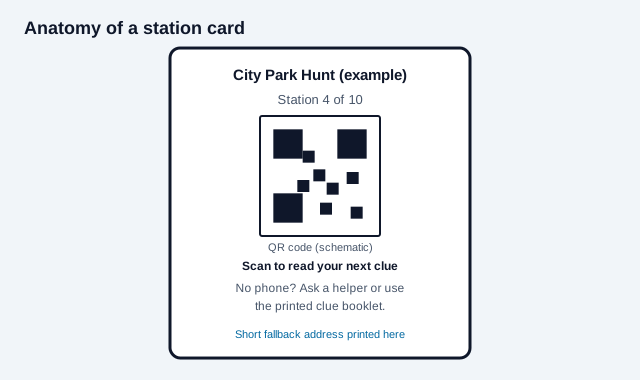
Do not place an unlabeled QR Code in public and expect people to trust it. The FBI has warned that criminals use QR Codes to direct people to pages that request sensitive information or deliver malware. A consistent event name, organizer identity, destination description, and tamper-resistant mounting make legitimate stations easier to recognize.
How do you keep a hunt accessible, with a no-phone route?
Scanning must not be the only way to receive essential instructions. Provide the station number and clue in text where appropriate, or give teams a printed clue booklet, readable fallback URL, NFC alternative, or staffed assistance. Ensure the same activity can be completed without owning a compatible smartphone.
W3C accessibility guidance calls for labels or instructions when users must enter information. Use descriptive form labels, sufficient contrast, simple language, logical heading order, keyboard-accessible pages, captions or transcripts for media, and text alternatives for meaningful images. Avoid puzzles that depend only on color, sound, tiny text, precise motion, or a strict countdown unless an equivalent route exists.
Our QR code accessibility guide goes further on labels, contrast and alternatives. Plan mobility and sensory access across the physical route too. An accessible web form does not compensate for a station reachable only by stairs or mounted beyond comfortable scanning height.
What about privacy for schools, workplaces, and public events?
In the US, the Children's Online Privacy Protection Act (COPPA) protects children under 13. The FTC's FAQ says the rule treats photos, videos and audio that contain a child's image or voice as personal information, and that precise location data can count too. An operator generally needs verifiable parental consent before collecting such information. Whether COPPA applies to a school or club activity depends on who runs the online service, so ask your school or organization's privacy lead. For young children, a printed clue card or a staffed checkpoint avoids the question.
- Collect no personal data unless the activity requires it.
- Use team aliases or organizer-issued IDs instead of full names where possible.
- Do not request passwords, authentication codes, financial data, or sensitive health details.
- Tell participants what is collected, why, who can view it, and when it will be deleted.
- Restrict result spreadsheets and remove unnecessary collaborators.
- Obtain appropriate consent for photos, especially for children and employees.
- Follow the institution's child-safeguarding, privacy, and records policies.
How do you prevent tampering and broken stations?
Use supervised locations, place the event name across both the sign and mounting surface, and inspect every station immediately before play. A malicious sticker can cover a legitimate code while leaving the rest of the design visible. Ask participants to report mismatched domains, unexpected sign-in screens, payment requests, app downloads, or certificate warnings.
Keep a master list containing station number, exact URL, correct answer, next clue, placement, and replacement card. Assign a monitor who can pause the hunt, send a neutral bypass clue, and replace a damaged sign without exposing later answers.
What belongs in a dress rehearsal?
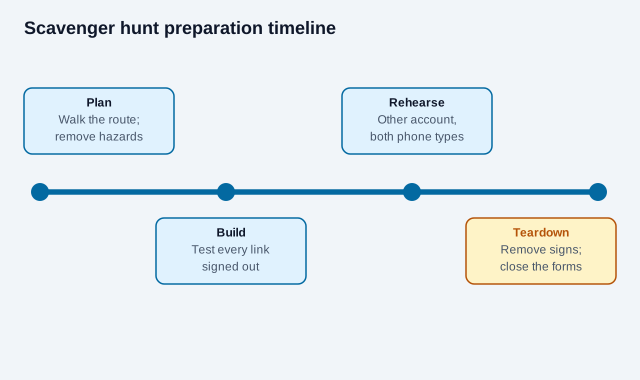
- Test while signed out and with a non-organizer account.
- Use both iPhone and Android devices where available.
- Check the venue's real mobile and Wi-Fi coverage.
- Scan final printed cards at their mounted height and lighting.
- Try correct, incorrect, empty, and alternate-format answers.
- Confirm confirmation messages and route order.
- Complete the accessible and no-phone alternatives.
- Time the entire route with realistic walking and queue delays.
- Verify that every location remains permitted and safe.
- Close or unpublish collection and remove signs after the event.
How does a scavenger hunt code go wrong?
Consider an office organizer who builds ten stations with one shared form, prints the cards the night before, and tests them only from her own signed-in account. On the day, two stations sit in a corridor with no mobile signal, one card is taped over a poster that facilities removes at noon, and the form quietly asks participants to sign in because the one-response limit is on. Half the teams stall at station three. This is an illustration, not a real case. The fixes are all in the lists above: a signed-out test, a venue signal check, permission for every mounting spot and a monitor with spare cards.
For other group activities, see the guides for education and events. If a station will not scan, why a QR code might not scan lists the usual causes.
What depends on your venue and players?
Child-safeguarding, privacy and public-space rules differ by school, employer, city and country, and a QR code does not change them. Venue owners may need to approve signage. Google can change Forms settings and wording, so recheck the current options before you build. Check with your institution's privacy and safeguarding leads and the venue. This guide is general information, not legal advice.
References
- Google: publish and share Forms with responders
- Google: response-validation rules
- Google: view and manage form responses
- Google: customize form confirmation messages
- FTC: complying with COPPA, frequently asked questions
- Google: send out your form
- TEEX: cyber safety scavenger hunt (example of a safety-themed hunt)
- W3C WAI: labels or instructions (WCAG 2.2)
- FBI IC3: cybercriminals tampering with QR codes (January 2022)
- DENSO WAVE: QR Code area and quiet zone