A QR code rarely earns its space in a standard web banner. The ad is already clickable, the person may be on a phone, and most slots are too small to hold a code that scans comfortably from a monitor. It can work in larger desktop units when the offer belongs on a phone, and it is usually a better fit for connected TV and screens in public places.
"Display ad" has two meanings. This guide is about online display ads: banners and rectangles on web pages. If you mean a printed display such as a window poster, floor stand or trade-show panel, skip to the section on printed displays near the end, because a code suits those far better.
For online ads, the guide shows which sizes can hold a usable code, includes our decode test at banner sizes, and covers creative, platform policy, disclosures and measurement.
Should you put a QR code in a display ad?
Ask three questions. Is the viewer on a larger screen? Does the action belong on a phone? Will the ad stay in view long enough? If any answer is no, use the click.
| Format | Verdict | Why |
|---|---|---|
| Mobile banner (320×50, 300×50) | No code | The phone cannot scan its own screen. NN/G says a direct link is better here. |
| Desktop leaderboard (728×90, 970×90) | No code | Only about 70 pixels of height, so the phone would need to be very close. |
| Desktop rectangle or half page (300×250 and up) | Only for phone-first offers | Enough room for a code, but it takes space from the message. |
| Connected TV | Good fit | No click exists, the screen is large, and the phone is often in reach. |
| Digital screens in public | Good fit where people wait | See the billboard guide for sizing and slot timing. |
Time is the hard limit. NN/G says people need at least 15 seconds to scan a code. The industry's viewable-impression standard, from the Media Rating Council, counts a display ad as viewable when half its pixels are on screen for one continuous second. Viewable does not mean a person had time to find a phone, open the camera and scan, so a code suits ads on pages where people linger, not ones they scroll past.
Which ad sizes can hold a usable QR code?
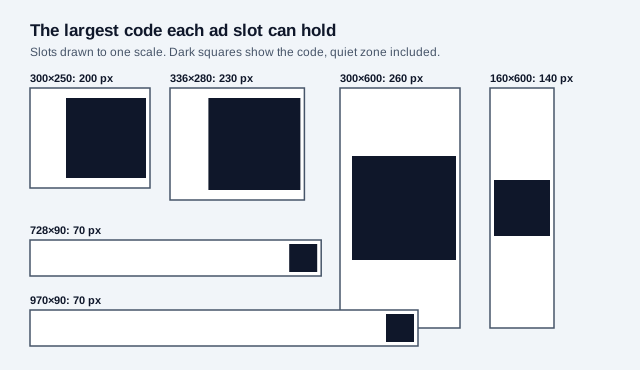
The table below takes standard sizes from Google Ads and works out how far away a phone could read the largest practical code, leaving a small margin and some room for the message. We converted pixels at the CSS reference of 96 per inch, then applied the common 10:1 rule of thumb. Screens differ, so treat the distances as estimates.
| Slot | Largest practical code | Approx. width on screen | Estimated scan distance | Our view |
|---|---|---|---|---|
| 300×600 half page | 260 px | 6.9 cm | About 69 cm | Best standard option |
| 336×280 large rectangle | 230 px | 6.1 cm | About 61 cm | Workable, little room for copy |
| 300×250 medium rectangle | 200 px | 5.3 cm | About 53 cm | Workable, little room for copy |
| 160×600 skyscraper | 140 px | 3.7 cm | About 37 cm | Close to the screen |
| 728×90 leaderboard | 70 px | 1.9 cm | About 19 cm | Too close |
| 970×90 large leaderboard | 70 px | 1.9 cm | About 19 cm | Too close |
The rectangle sizes show the trade-off. A 200-pixel code leaves about 90 pixels of width in a 300×250 slot, so the headline and logo have to fit in a narrow strip. On a large rectangle, a 150-pixel code leaves more room for copy, at a shorter estimated scan distance of about 40 cm.
How small can a QR code go before it stops decoding?
We tested this. We rendered three URLs at three error-correction levels, downsampled each to widths from 50 to 200 pixels the way an image resize would, and decoded the results with the jsQR library. Widths include the four-module quiet zone. The test script is kept in our repository.
| URL length | Level | Modules | Smallest width decoded |
|---|---|---|---|
| 29 characters (short link) | L | 25 | 50 px |
| 29 characters | M | 29 | 60 px |
| 29 characters | Q | 29 | 60 px |
| 85 characters (with UTM tags) | L | 37 | 70 px |
| 85 characters | M | 41 | 70 px |
| 85 characters | Q | 45 | 90 px |
| 141 characters (long tags) | L | 45 | 90 px |
| 141 characters | M | 49 | 100 px |
| 141 characters | Q | 57 | 100 px |
Results were not perfectly smooth: the 85-character code at level M failed at 80 pixels after passing at 70, and the 141-character code at level L failed at 100 after passing at 90. Near the limit, success depends on how the pixel grid happens to fall across the modules, so a code close to the floor is unreliable. Our practical rule is to give a code at least 3 pixels per module, and more when you can. Even a short link with quiet zone spans 37 modules at levels M and Q, so that rule asks for about 110 pixels, which is another reason a 90-pixel-tall leaderboard is out.
A clean bitmap is the best case. This test used one decoder and no camera, screen glare, viewing angle or image compression, so real scanning needs a larger code. We have not measured phones reading monitors. The useful takeaway is the comparison: a long tagged URL needs about twice the pixels of a short link. Use a short URL in ads.
How do you design the creative?
- Say what the scan does, in specific words: "Scan to get the app" or "Scan for your code." NN/G warns against generic "Learn more" labels.
- Use a short link so the code stays coarse. See the table above.
- Save as PNG. Google Ads lists GIF, JPG and PNG for uploaded image ads with a 150 KB limit, and JPG compression can blur the sharp edges a code depends on.
- Keep the code dark on white, with the quiet zone inside the white block. Check the colors with the contrast checker.
- In animated ads, show the code on every frame so nobody is left holding up a phone to a code that has gone.
- Keep the ad clickable, and point the click at the same offer.
- Build each size by hand. Do not let a platform scale one master image, because the code can land at an awkward fraction of a pixel.
Avoid automated formats for this creative. Google says responsive display ads adjust size, appearance and format to fit the available space, and they combine assets automatically, so a code inside an image asset may not appear at the size you tested. An uploaded image ad gives you control of each size.
Do ad platforms allow QR codes in ads?
We found nothing in Google's Destination requirements page that mentions QR codes, so we cannot say how reviewers handle them. Check your platform's current policy or ask its support team before you spend. The same page does set rules that matter here: the ad must accurately reflect where people land, a final URL must not redirect to a different domain, and destinations must work on common browsers and devices.
The cautious reading is to treat the scanned destination to the same standard as the click destination. Send both to the same domain and offer. A short link on an unfamiliar domain also adds a trust problem, because the FTC tells people to inspect a URL before opening it.
A code does not move your legal duties elsewhere. Our billboard guide covers the same issue for outdoor: the FTC asks for disclosures close to the claim, and UK guidance summarized by law firms says an offer's significant conditions must appear in the ad itself. A small banner may leave no room for them, so keep the offer simple.
Where do QR codes work better than banners?
Connected TV is the natural home for a screen-based code. No click exists, the viewer usually has a phone nearby, and the code can stay on screen for a whole spot. Keep it there throughout if you can, since NN/G's 15-second figure is close to the length of a short TV spot. Size it for viewing from a sofa, using the 10:1 rule for the room distance.
Digital screens in transit and retail work for a similar reason: people are waiting. Print and packaging have their own guides, starting with newspaper and magazine ads. For a phone-first offer on the open web, a desktop page with room for a proper handoff often beats a banner. See QR codes on websites.
What if your display ad is printed or in-store?
Printed displays are a much better home for a code. There is nothing to click, and people often stand close enough to scan. Size the code from where they stand, using the 10:1 rule, and give it a specific prompt.
| Printed display | Typical distance | Starting width | Full guide |
|---|---|---|---|
| Counter or shelf card | 30 to 50 cm | 3 to 5 cm | Retail |
| Floor stand or poster | 1 to 2 m | 10 to 20 cm | Posters |
| Store window | 1 to 1.5 m | 10 to 15 cm | Windows |
| Trade-show panel | 1 to 3 m | 10 to 30 cm | Banners |
Distances are our planning examples, so measure your own site.
How do you measure a QR code in a display ad?
Use a separate tagged link for the code and the click, so they do not blur together in reports. A dynamic QR code per size gives you scan counts, and the UTM builder covers tagging. Put tags behind a short link, because the decode test shows long URLs cost you pixels.
Expect the ad platform to undercount. It records impressions and clicks, but a scan happens on another device, so it may not connect that visit to the ad. Compare scans per thousand impressions across sizes, and test a version with no code to see whether the code helps or simply takes space from the headline. See QR code tracking for setup.
What is a pre-launch checklist for a QR display ad?
- Confirm the offer belongs on a phone.
- Limit delivery to desktop and TV placements where your platform allows it.
- Choose 300×250 or larger, and skip leaderboards.
- Use a short link on a domain people recognize.
- Build each size separately and save as PNG.
- Scan the finished ad on a real monitor, at normal seated distance, with two phones.
- Check that the scan and the click reach the same offer on a mobile page.
- Run it against a no-code version, and judge it on your own results.
What does this guide not settle?
We found no independent benchmarks for QR scans in web banners. Widely quoted scan-rate figures come from vendors, and they do not separate banners from other formats, so we have left them out. Slot sizes and distances here are estimates, and our decode test used software alone. Platform policies change, so read the current versions.
This guide is general information and not legal advice.
Related: websites, billboards, posters, all placements.
References
- Nielsen Norman Group, 13 QR-Code Usability Guidelines (2024)
- Google Ads Help, uploaded image ad sizes and formats
- Google Ads Help, About responsive display ads
- Google Advertising Policies Help, Destination requirements
- ANA, Media Rating Council updates viewable ad impression measurement guidelines
- FTC, Scammers hide harmful links in QR codes to steal your information
- FTC, .com Disclosures: How to Make Effective Disclosures in Digital Advertising
- Osborne Clarke, Ensure that your QR code complies with the CAP Code
- jsQR decoder library, used for our decode test
- Tlinky, QR codes on web banners (vendor guide)