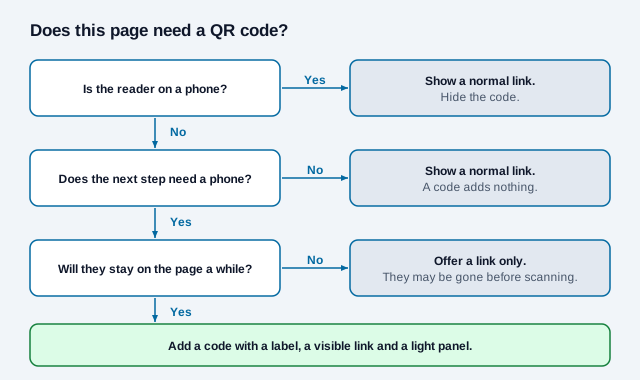
A QR code belongs on a website only when the reader is on a larger screen and the next step needs their phone. Good examples are installing an app, approving a login or taking a photo for a form. For anyone already on a phone, a plain link is better, since a phone cannot scan its own screen.
This guide helps you decide whether a page needs a code, then covers how to add one in HTML, size it for a monitor, handle dark mode and mobile visitors, and keep it accessible and safe.
When does a QR code on a website make sense?
The test is simple: is the person on one device, with the task on another? Nielsen Norman Group gives the same rule from the other side. If someone wants information on the device showing it, a direct link beats a code, and mobile sites should carry codes only when another device is meant to scan them.
| Use on a desktop page | Why a code helps | Link it to |
|---|---|---|
| App download | The app installs on the phone, not the computer | A store-routing link or one store page |
| Sign-in or device pairing | A signed-in phone approves the computer | A short-lived code generated for that session |
| Form step needing a camera | Photo of an ID or receipt is easier on a phone | A secure, single-use link to that step |
| Save a contact or map | The details are more useful on the phone | A contact file or map page |
| Printed web page | Links stop working on paper | The page's own URL, shown only in print |
| Kiosk or lobby screen | Nobody can take the screen with them | The next step on a mobile page |
A code in a site footer, linking to the homepage, is the one to remove. It asks visitors to reach for a phone to open a page they are already on.
How do you add a QR code to a web page?
Generate the code once with a URL QR code generator, export it as SVG, and host the file on your own site. That keeps it sharp on any display and avoids a runtime call to an outside image service, which would add a dependency and could share page addresses with a third party. Dynamic codes for logins or sessions need to be generated server side instead.
Show the code and put a real text link beside it. Do not rely on wrapping the image in a link, because the image may be hidden on phones:
<figure class="qr-handoff">
  <img src="/images/app-qr.svg" width="200" height="200"
       alt="QR code that opens the Example app download page">
  <figcaption>
    Scan to get the app, or visit
    <a href="https://example.com/app">example.com/app</a>
  </figcaption>
</figure>
Setting width and height reserves the space while the file loads, and the text link works for anyone who cannot scan. NN/G also recommends showing the URL next to a code when some people will have devices without cameras, such as laptops.
On WordPress, Squarespace, Wix and similar builders, you rarely need custom code. Upload the file through an image block and add the link in a text block below it. Paste HTML only if you want the CSS in this guide. Some builders convert uploads or refuse SVG, so use a PNG of at least 600 pixels there and let the block display it smaller. Avoid embed widgets that load the code from another service for a single fixed link.
How big should a QR code be on screen?
Aim for about 150 to 230 CSS pixels. A person sitting 40 to 60 cm from a monitor, using the common 10:1 distance rule, needs a code roughly 4 to 6 cm wide. At the CSS reference of 96 pixels per inch, that works out to about 150 to 230 pixels. Real displays and scaling settings vary, so test on your own screens.
Smaller codes can be readable in principle. In our software test, a clean bitmap of a short URL decoded down to 60 pixels wide, and full details are in the display ads guide. That result is a decoder reading perfect pixels, and it says nothing about a phone held up to a monitor, so treat it as a floor and not a target.
- Set a
min-widthso a responsive layout cannot squeeze the code. - Prefer SVG. For a PNG, scale by whole numbers and use
image-rendering: pixelatedso edges do not blur. - Keep the destination short, because a shorter URL means fewer modules and a cleaner code. See QR code data limits.
- Keep four modules of clear margin on every side, as ISO/IEC 18004 specifies.
- Check that cookie banners and chat buttons do not cover it.
Corners matter more than you might expect. We covered each corner of a short-link code with a white square and decoded it with the jsQR library at four error-correction levels. Those three large squares in the corners are what a scanner locks onto, and the corner without one is the most forgiving.
| Corner covered | 10% of code width | 20% | 30% |
|---|---|---|---|
| Bottom right (no finder square) | Read at all levels | Read at all levels | Failed |
| Top right | Read at all levels | Failed | Failed |
| Bottom left | Read at all levels | Failed | Failed |
| Top left | Read at Q and H only | Failed | Failed |
A higher error-correction level did not rescue a covered finder square in this test, so a chat button over the code has to be moved. This was software on a clean bitmap, and a phone camera may differ.
How do you handle dark mode?
Keep the code dark on light in every theme. NN/G advises against inverted codes because some scanners cannot read them, and a light-on-dark version on a dark page is exactly that. Our test showed the same split: jsQR failed on an inverted code in its normal mode and read it only with its inversion option on. Put the code on a fixed white panel that includes the quiet zone, and make sure your dark theme's image filters do not touch it:
.qr-handoff img {
  background: #fff;
  padding: 16px;
  box-sizing: content-box;
  min-width: 150px;
  filter: none;
}
If your code has its quiet zone built into the file, you can reduce the padding. Check any brand colors with the contrast checker.
Should you hide the code on phones?
Usually yes, and keep the link. A CSS media query can hide the image for touch-first devices while the text link stays visible:
@media (hover: none) and (pointer: coarse) {
  .qr-handoff img { display: none; }
}
This is a best guess about the device, and it can misjudge touchscreen laptops and tablets, which is why the link must stay visible.
A code can also do useful work in print. Hide it on screen and reveal it with @media print, so a printed recipe, manual or policy still leads back to the live page. Generate it per page at build time if the site has many of them.
How do you make a website QR code accessible?
A code is an image, so WCAG Success Criterion 1.1.1 applies: it needs a text alternative that does the same job. Describe what the code does, not what it looks like. "QR code that opens the Example app download page" is useful. "QR code" alone tells a screen reader user nothing.
The code must also never be the only route. Some people cannot hold a phone steady or cannot see the screen, and others have no second device. A link, and a typed address where it fits, covers them. There is more in our QR code accessibility guide.
What are the security risks of QR codes on websites?
People cannot read a code's destination before scanning, so they have to trust the page showing it. The FTC tells consumers to inspect a URL before opening it, so use a recognizable domain and show it beside the code.
- Login codes: OWASP describes QRLJacking, where an attacker puts a live login code on a phishing page and the victim's scan authorizes the attacker's session. OWASP's mitigations include a confirmation prompt with details of the requested login and quick expiry.
- Personal or session codes: Exclude them from page caches and CDNs, and make them single-use. Otherwise one visitor's code can reach another.
- User-submitted images: If people can post images on your site, a code in one can lead anywhere. Treat it as you would a link from a stranger.
- Static files: Include your code files in any change monitoring, because a swapped image changes the destination and no text on the page changes with it.
Our QR safety guide covers these risks from the scanner's side.
Should you put a QR code in an email?
Usually not. Many people read email on the phone they would scan with, and the FTC specifically says not to scan a code in a message you were not expecting. A code in a marketing email looks like the scam it warns about, and some clients also block images until the reader allows them.
The exception is a code meant to be shown, not scanned by the reader. An event ticket or boarding pass in an email is read by staff at the door. See event ticketing QR codes for how those should work.
How do you measure a code on a web page?
Tag the destination with the UTM builder, such as utm_source=website&utm_medium=qr&utm_content=pricing-page, or use a dynamic QR code for scan logs. Expect a gap in the reporting. The computer and phone usually appear as two separate visitors, so analytics will show a new mobile session with no link to the desktop visit unless the person signs in on both. Compare scans against page views for that page, and see QR code tracking for the full setup.
What does this guide not settle?
We found no independent data on how often visitors scan codes on web pages, and the vendor advice we reviewed comes from companies with a stake in the answer. A simple A/B test is the fair check: compare a page with a link alone against a page with a link and a code. Screen sizing here is calculated from the 10:1 rule, not measured with phones.
Related: display ads, app download QR codes, QR code frames, all placements.
References
- Nielsen Norman Group, 13 QR-Code Usability Guidelines (2024)
- W3C, Understanding SC 1.1.1: Non-text Content
- OWASP, QRLJacking
- FTC, Scammers hide harmful links in QR codes to steal your information
- ISO/IEC 18004:2024, QR code bar code symbology specification
- jsQR decoder library, used for our decode tests
- Bitly, What's the Minimum Size for a QR Code?