Choose QuickQRC if you need up to 100 dynamic codes at a low yearly price, or if you want printed codes to keep working after a plan ends. Choose QR TIGER if you need more than 100 codes at the lowest price, a Canva integration, or a mobile app. Teams that want 10 users or single sign-on should look at QuickQRC Business. That is the short version, and the sections below show the numbers behind it.
Disclosure: we make QuickQRC, so we are not a neutral party. To keep that in check, every QR TIGER figure below links to QR TIGER’s own pages, and we list where it beats us.
How did we compare them?
We read QuickQRC’s live pricing and comparison pages, checked our own redirect code, and read QR TIGER’s pricing page and help center on October 31, 2026, then rechecked them on November 10, 2026. QR TIGER’s figures are vendor-reported. We did not buy a QR TIGER plan or run scan tests on its codes, so this article compares published terms, not day-to-day performance. Prices are in US dollars and can change, so confirm them before you pay.
How do the plans compare at a glance?
| What you get | QuickQRC | QR TIGER |
|---|---|---|
| Free dynamic codes | 5, no plan-wide scan cap | 3, with 500 scans per code |
| Free plan branding on scans | No ad screen at the check date | QR TIGER logo popup |
| Entry paid plan | Pro: $5.99 a month, or $4.80 a month billed yearly | Regular: $7 a month |
| Dynamic codes on entry plan | 100 | 12 |
| Next plan up | Business: $44.99 a month, 500 codes | Advanced: $16 a month, 200 codes |
| Larger plan | Enterprise, through sales, from $149.99 a month | Premium: $37 a month, 600 codes |
| Users | 3 on Pro, 10 on Business | 1 on Regular; the Advanced and Premium cards list 1 or 2 |
| Password protection and UTM parameters | From Pro | From Advanced |
| Rules that route scans to different links | From Pro | Premium (Smart Multi URL) |
| Bulk creation | From Pro | From Advanced, up to 3,000 per batch |
| Your own domain | Business, subdomain only | Premium, 1 white label domain |
| Download formats | PNG, SVG, PDF, EPS | PNG, SVG, PDF, EPS |
| Dynamic codes after a paid plan ends | Keep redirecting; editing and analytics pause | Become invalid |
Sources: QuickQRC pricing, QuickQRC comparison page, QR TIGER pricing, QR TIGER help center. QR TIGER’s plan cards list most features on every card and mark the ones a plan lacks; the per-plan rows above reflect our October 31 reading, so confirm the plan you need on its live page.
Which one costs less?
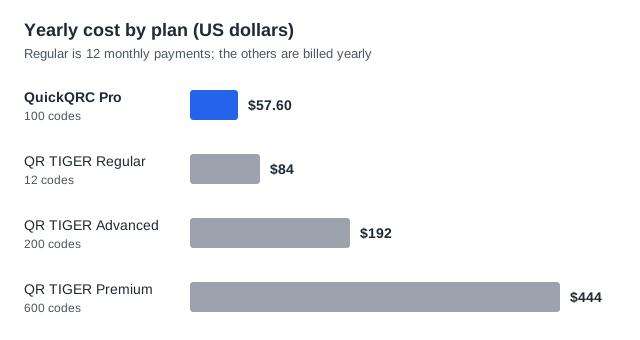
It depends on how many dynamic codes you need. QR TIGER’s pricing page shows Advanced at $16 a month and Premium at $37 a month, which it showed as billed annually on October 31, 2026. That comes to $192 and $444 a year. Regular shows $7 a month. We could not read a separate yearly price for it, so the chart uses $84, which is 12 monthly payments.
- Up to 5 codes: QuickQRC Free costs nothing. QR TIGER Free covers 3 codes, each with a 500-scan limit.
- 6 to 12 codes: QuickQRC Pro comes to $57.60 a year. QR TIGER Regular comes to $84 if paid monthly.
- 13 to 100 codes: QuickQRC Pro stays at $57.60. QR TIGER needs Advanced, at $192.
- 101 to 200 codes: QR TIGER Advanced wins on price, at $192 against $539.88 for QuickQRC Business.
- 201 to 600 codes: QR TIGER Premium is cheaper at $444 and goes up to 600 codes. QuickQRC Business stops at 500, but includes 10 users and single sign-on.
Over three years, the 13-to-100 case comes to $172.80 on QuickQRC Pro and $576 on QR TIGER Advanced, assuming neither price changes. Features widen the gap for some buyers: rules that send scans to different links start at Pro on QuickQRC and at Premium on QR TIGER, which is $57.60 against $444 a year.
What happens to printed codes if you stop paying?
This is the biggest difference between the two, and it matters most for anything expensive to reprint, such as packaging, signs and menus.
QR TIGER’s help article, last updated June 27, 2025, says that after a plan expires, “All dynamic QR codes will become invalid.” You can still log in, but you cannot edit those codes or view their analytics. Its free plan has a separate limit of 500 scans per dynamic code.
On QuickQRC, a dynamic code keeps redirecting after a paid plan lapses, and editing and analytics pause until you renew. There is one exception. If a code is password protected and your plan no longer includes that feature, the code stays closed, so a private destination never opens to everyone. Remove the password while your plan is active if the code needs to stay public. A code also stops if you set your own expiry date or scan limit on it.
Static codes from either tool hold the destination in the pattern, so they do not depend on a subscription. The guide to whether QR codes expire covers every other way a code can stop working.
Where is QR TIGER the better choice?
- Volume per dollar: Advanced offers 200 codes for $192 and Premium 600 for $444, both below the $539.88 for QuickQRC Business.
- Branded links: Premium includes one white label domain for $444. Custom domains on QuickQRC start at Business, for $539.88, and need a subdomain such as go.yourbrand.com.
- Integrations: every paid QR TIGER plan lists a Canva integration, and Advanced adds Zapier and HubSpot. QuickQRC has no Canva integration.
- Geofencing: Premium can restrict scanning to a zone. QuickQRC can route by country, device, OS or language on Pro, but it has no geofence.
- Mobile app: QR TIGER offers an app. QuickQRC runs in the browser, with no native app.
- File storage: every QR TIGER plan lists unlimited file storage, within upload limits of 5 MB to 20 MB per file on paid plans. QuickQRC Free includes 100 MB in total.
- Language: QR TIGER publishes its site in many languages. The QuickQRC dashboard is English only.
Where is QuickQRC the better choice?
- Small to mid-size use: Pro includes 100 codes where Regular includes 12, at a lower price.
- Teams: Pro includes 3 users and Business includes 10, with single sign-on. QR TIGER’s plan cards list 1 user on Regular and 1 or 2 on Advanced and Premium.
- Features at the entry price: password protection, UTM parameters, bulk creation and routing rules are all in Pro. QR TIGER Regular locks all four.
- Free scans: the free plan has no 500-scan limit per code, so a popular poster will not hit that ceiling.
- Leaving: your printed dynamic codes keep working after you stop paying, with the password exception above.
- Developers: Pro includes 25,000 API requests a month. QR TIGER lists 3,000 on Advanced.
- Tracking on the free plan: you can connect your own GA4, Tag Manager or Meta Pixel without upgrading.
QuickQRC lists 50 static and 19 dynamic types. The two companies count types differently, so check that your specific type exists instead of comparing totals. All QuickQRC types are on the QR code types page.
Which should you pick?
| If this matters most | Pick | Why |
|---|---|---|
| Trying dynamic codes for free | QuickQRC | More codes and no per-code scan limit |
| A small business with up to 100 codes | QuickQRC | Lowest yearly cost at this size |
| Printed codes that survive cancellation | QuickQRC | Codes keep redirecting after a plan lapses |
| More than 100 codes at the lowest price | QR TIGER | Advanced and Premium cost less than Business |
| A team of 4 to 10 people | QuickQRC | Business includes 10 users and single sign-on |
| Your own domain at the lowest price | QR TIGER | Premium includes one for $444 |
| Canva, a mobile app or a non-English dashboard | QR TIGER | QuickQRC offers none of these yet |
How do you try this before you commit?
Start with one real job, not a test link. Create a free dynamic code on QuickQRC, print it at the size you plan to use, scan it on two phones, then change the destination and scan it again. If you are still deciding between code types, read static vs dynamic QR codes first. For a wider view on what paid plans buy, see free vs paid QR generators. If your team needs security certifications, read QuickQRC vs Uniqode.