The best free QR code generator depends on what the code has to survive. For a link that never changes, any static generator works, and the code never expires. For a code you may need to edit, QuickQRC, Hovercode and QRCodeChimp give you editable codes with scan data and no trial clock. Canva gives you editable codes with no stated limit but no scan data on its free plan. QR TIGER’s free codes stop for good at 500 scans, so keep them off anything you print.
Disclosure: we make QuickQRC, one of the tools below. We read each vendor’s own pricing page and help center between October 31 and November 3, 2026, and rechecked them on November 10, 2026. Every competitor figure is vendor-reported, and the sources are listed at the end of this page. We did not open a paid account anywhere or run scan-speed tests, so this compares published terms, not performance. Free plans change often; check the linked page before you print.
What does “free” actually mean for a QR code?
Two different things get sold under the same word. A static code holds your link inside the printed pattern. No server sits in the way, so it cannot run out of scans, show an ad or be switched off. A dynamic code holds a short address on the vendor’s server, which forwards each scan to your page. That forwarding is what lets you edit the link and count scans, and it is also what a free plan can limit. Our guide to static vs dynamic QR codes explains the difference in more detail.
So every free plan below is really answering four questions: how many dynamic codes, how many scans, how much scan data, and what the person scanning sees on the way.
How do the free plans compare?
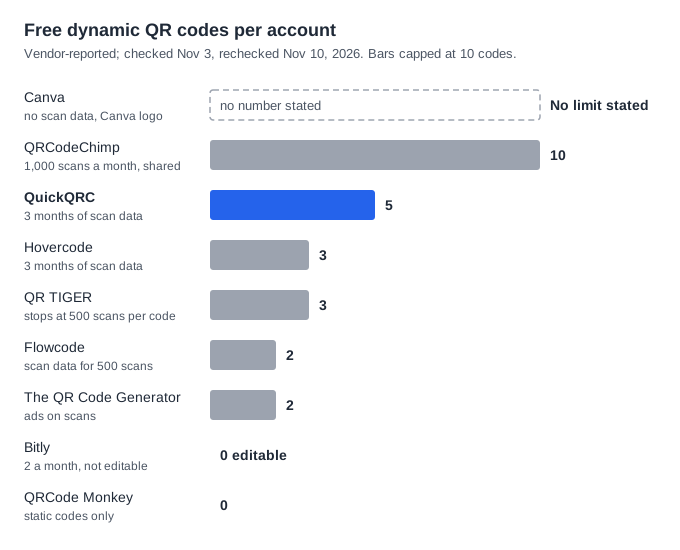
| Tool | Free dynamic codes | Scan limit | Scan data | What scanners see |
|---|---|---|---|---|
| QuickQRC | 5 | None | 3 months | Your page; no ad screen at the check date |
| Hovercode | 3 | None | 3 months, basic | Your page; Hovercode branding stays until Pro |
| QRCodeChimp | 10 | 1,000 a month across all codes | Basic | Your page, until the monthly limit is hit |
| Canva | No limit stated | None stated | None on Free | Your page; the code carries Canva’s logo |
| Flowcode | 2 | None; codes “always scan” | First 500 scans | Your page |
| The QR Code Generator | 2 | None stated | 14 days | Ads |
| QR TIGER | 3 | 500 per code, then the code stops | Basic | A QR TIGER logo popup |
| Bitly | 2 new codes a month, not editable | No cap listed | None | An ad page with a link preview |
| QRCode Monkey | None (static only) | None | None | Your page |
Two well-known names are missing on purpose. Uniqode and QR Code Generator (QRCG) offer 14-day trials, not free plans, and their dynamic trial codes stop working when the trial ends unless you pay. Our article on what happens when a subscription ends quotes both policies.
Which free codes stop working, and when?
This is where free plans really differ. Three rules can break a printed code.
- A lifetime scan cap (QR TIGER). Its pricing page lists 500 scans per free dynamic code. Its help article on scan limits says the code becomes inactive at that point, and the fix it gives is to upgrade and create a new dynamic code. A new code means a new print run.
- A shared monthly cap (QRCodeChimp). The free plan allows 1,000 scans a month across all your dynamic codes. Its help article on paused codes says codes pause when the limit is reached and you can wait for the monthly reset or upgrade. The pause is temporary, which is much kinder than a permanent stop, but it can still last for days.
- A trial clock (Uniqode, QRCG). Dynamic trial codes stop when the 14 days end.
Put numbers on it. A café table card scanned 40 times a day reaches 500 scans on day 13. On QR TIGER’s free plan, that card goes dead in its second week. On QRCodeChimp, 40 a day comes to about 1,200 a month, so the card pauses around day 25 and stays paused until the month resets. On QuickQRC, Hovercode, Canva and Flowcode, the free plan sets no scan cap, so the card keeps working.
Hovercode’s pricing page describes its free plan as permanent rather than a trial, with unlimited scans. Canva’s help article says its dynamic codes never expire unless you set an expiry date. We built QuickQRC’s free plan with no end date either, and we have no scan cap on any plan.
What does the person scanning see?
A free code can work and still put something between your customer and your page. Bitly’s support article on ads says free accounts show a page with a destination preview and an ad. The QR Code Generator’s free codes show ads too, according to its pricing page. QR TIGER lists a logo popup on its free plan.
For a menu or a product label, that extra screen costs you scans: people who meet an ad before the page they expected may simply close it. If a tool says “ads” anywhere on its free tier, scan a test code on your own phone before you print.
We should be open about our own setup. QuickQRC has an optional countdown screen for free-plan scans that can show an ad. It was switched off when we checked on November 10, 2026. If we turn it on, this page will say so.
How much scan data do you get for free?
Scan data is the second reason to choose dynamic over static, and free plans ration it in different ways:
- By time: QuickQRC and Hovercode keep 3 months. The QR Code Generator keeps 14 days, so a monthly report is already impossible.
- By scans: Flowcode reports on the first 500 scans. The code keeps working after that, but the counting stops.
- Not at all: Canva’s help article puts scan Insights on Business, Enterprise and Nonprofit plans only. Bitly’s pricing page lists no click or scan data on its free plan.
If you only need to know whether a poster gets scanned at all, 3 months is plenty. If you report to a client each quarter, export your numbers before they roll off. Our QR code tracking guide explains which figures are worth keeping.
Which free generator should you use for each job?
| Your job | Good free choice | Why |
|---|---|---|
| A link that will never change, such as your homepage | Any static generator: QRCode Monkey, QuickQRC or Canva’s static tool | No account, no server, nothing to expire |
| A handful of printed codes you may need to edit | QuickQRC (5) or Hovercode (3) | No scan cap, no ad screen, 3 months of data |
| Up to 10 low-traffic codes, such as shelf labels | QRCodeChimp | 10 codes, if total scans stay under 1,000 a month |
| Many editable codes in designs, with no reporting | Canva | Free dynamic codes with no stated limit, inside the editor you already use |
| A small hosted page behind the code | Flowcode (2 pages) or QuickQRC (1 page) | A landing page without paying for a website |
| A busy code at a counter or on a table | Avoid QR TIGER Free and QRCodeChimp Free | Both caps can stop or pause the code mid-month |
QuickQRC is not the best fit for everyone. Our free plan allows 5 dynamic codes against Canva’s uncapped allowance and QRCodeChimp’s 10, the dashboard is in English only, and there is no native app. For a large number of editable codes you will never measure, Canva gives you more for free.
How do you check a free plan before you print?
- Find the scan rule. Search the vendor’s help center for “scan limit” and read what happens when you reach it: a pause, a permanent stop, or nothing.
- Scan a test code on your own phone. Look for an ad, a popup or a vendor page before yours.
- Read the downgrade article. If you might pay later and then stop, find out which codes survive. The subscription-end comparison lists ten vendors.
- Estimate your scans. Daily scans times 30 tells you whether a monthly cap matters.
- Keep the account in your company’s name. A code made on a freelancer’s free account leaves with the freelancer.
The wider trade-offs between free and paid tools, including privacy and hidden costs, are in free vs paid QR code generators. For vendor-by-vendor detail, read QuickQRC vs QR TIGER, QRCode Monkey, Flowcode and Canva.
If you want an editable code with no scan cap and no trial clock, create a free dynamic code on QuickQRC, scan it on two phones, then change the link and scan it again.
Where do these figures come from?
Each vendor’s own pages, read on the dates shown and rechecked on November 10, 2026. We will re-check them each quarter and update this page when a free plan changes.
- QR TIGER pricing and scan-limit help article (updated September 1, 2025), read November 3, 2026
- QRCodeChimp pricing and paused-code help article (updated October 2, 2025), read November 3, 2026
- Hovercode pricing, read November 3, 2026
- Canva QR code help article, read November 3, 2026
- Flowcode pricing, read October 31, 2026
- The QR Code Generator pricing, read October 31, 2026
- Bitly pricing and ads article, read October 31, 2026
- QRCode Monkey home page, read October 31, 2026
- QuickQRC pricing page and our own redirect settings, checked November 10, 2026