Salons and barbershops use QR codes at reception, at the mirror, at the till and on appointment cards to open online booking, a price list, aftercare instructions, a loyalty sign-up or a review page. Give each code one job, ask every client for a review the same way, and collect only the health and contact details a service actually needs.
This guide covers what to link where, how to run the booking and cancellation policy so clients see it before they pay, how patch-test and allergy information should be handled, how to use a review code without breaking Google's rules or the FTC's review rule, and where each code goes in the salon.
Which QR code belongs at which point in the salon?
Match the code to the moment. A client waiting at reception can rebook. A client in the chair has time to read aftercare. A client at the till is ready to leave a review.
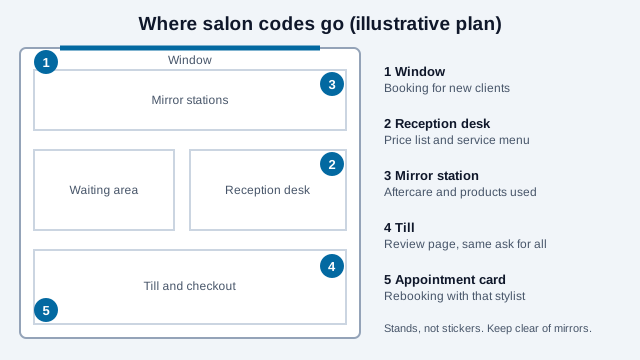
| Position | Destination | Why it fits |
|---|---|---|
| Window or door | Online booking for new clients | Passers-by are choosing a salon |
| Reception desk | Price list and service menu | A page you can update without reprinting laminated cards |
| Mirror station | Aftercare for the service and products used | Clients have time and a reason to scan |
| Payment point | Review page | The visit is fresh and the client is not rushed |
| Appointment card | Rebooking page for that stylist | The next visit is booked before they leave |
| Waiting area | Guest Wi-Fi code | Use a guest network only; anyone who photographs it can read the password |
Use a rigid stand, not a sticker, at a height a standing client can aim a phone at. Avoid mirrored or backlit surfaces directly behind the code, because reflections defeat a camera. Matte finish, dark modules on light, and a clear quiet zone keep it reliable. A branded code with a small center logo works at error-correction Level H if you test the printed result; the logo best practices explain the limits.
How should a booking code handle policies and deposits?
A booking page is where a client agrees to your cancellation terms, so show them before the confirm button, not buried in a footer. Sources aimed at salons describe a common pattern: a stated notice window such as 24 hours, a late-cancellation fee or a deposit, a card on file, and reminders. Vendor guidance suggests deposits of 25 to 50% of the service value, kept for no-shows and refunded when the client cancels in time, and some salons take deposits only for new clients or long colour appointments. A booking-software vendor claims a deposit cuts no-shows by 55%, but that is the vendor's own figure, not independent research.
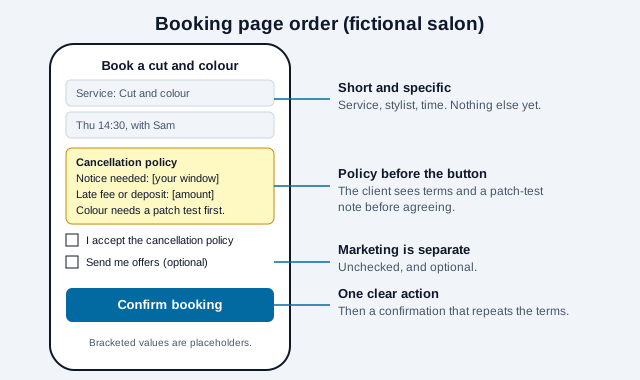
- Show the policy on the booking page and repeat it in the confirmation message.
- State the fee, the deadline and what happens to a deposit in plain words.
- Keep the QR destination the booking page itself, so a rebooking client sees the same terms every time.
- Check local consumer law on deposits and fees. Rules about what you can keep, and how you must disclose it, vary by state and country.
What should intake and patch-test information look like?
Allergy and skin-reaction information is health information. The FDA says some coal-tar hair dyes can cause allergic reactions, that p-phenylenediamine (PPD) is the ingredient most often linked to them, and that a reaction can occur even if a person has used the dye before without trouble. Its consumer advice is to do a skin test before every use. FDA also notes the caution statement on coal-tar hair dyes: they must not be used on eyelashes or eyebrows. In the UK, the National Hair and Beauty Federation advises recording patch tests, keeping consultation forms in a secure place for four years, and never carrying out allergy alert tests on clients under 16. Those figures describe UK trade guidance; your jurisdiction, insurer and product instructions decide what applies to you.
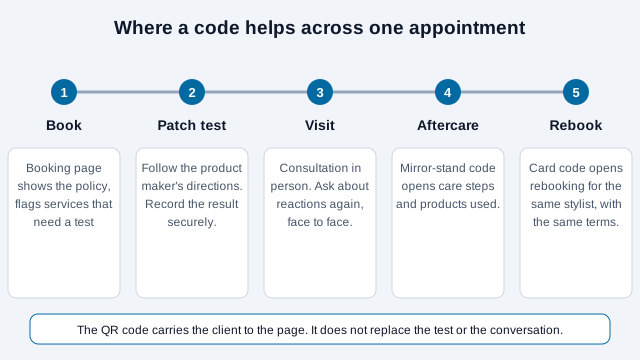
A QR code can carry a client to the form, but it cannot decide what to ask. Keep the form short:
- Name, contact details and service. Ask allergy and skin questions only for services where they matter.
- A yes or no on prior reactions, with the detail collected at the consultation in person.
- A separate, unchecked box for marketing offers, not bundled with "confirm appointment".
- A plain line on how long you keep the information and how a client can ask to have it removed.
Never put a client's name or history in a link that can be edited, such as ?client=2231. Health-related details need extra care under GDPR and similar laws, so UK and EU salons should confirm their lawful basis with an adviser. Many booking platforms already include consent and patch-test reminders; use those features before building your own.
Can you use a QR code to ask for Google reviews?
Yes, with discipline. A review code at the till is a normal, useful placement. Three rules apply:
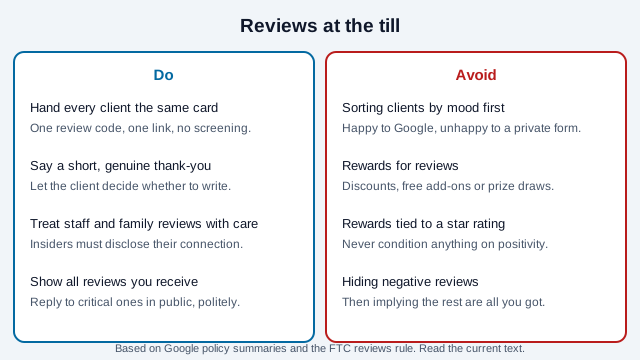
- Ask everyone the same way. Sending happy clients to Google and unhappy ones to a private form ("review gating") is reported by multiple review-management guides to violate Google's policy against selectively soliciting positive reviews. Those guides are secondary summaries, so read Google's current policy text.
- Do not reward reviews. The same guides say Google prohibits discounts, free services or prize draws in exchange for reviews. The FTC's rule on consumer reviews, which took effect October 21, 2024, separately bars compensation or incentives that depend on a review saying something positive or negative, and requires insiders such as staff to disclose their connection.
- Do not hide the ones you dislike. The rule also prohibits misrepresenting that the reviews you display are most or all of the reviews submitted when some have been hidden for being negative. The rule's text does not name gating directly, and commentators differ on how it applies, so treat gating as a platform-policy problem at minimum.
Put the code on a card at the till, hand it over, and say a short genuine thank-you. The Google review QR code guide covers the link format.
Static or dynamic, and can you track results?
Static codes suit a salon. They cost nothing, never expire, and you edit the price list and aftercare pages without reprinting. UTM parameters from the UTM builder show which placement drives booking and review-page visits in your analytics, so call them page visits, not scans. If you reprint often, the bulk generator makes one code per stylist, and a paid dynamic code is worth it only if one printed code must point to different places over time. The static vs dynamic guide compares them, and QR loyalty programs covers punch-card style repeat visits.
What mistakes break salon QR programs?
Consider a salon that prints a laminated card with a review code and a "10% off for a 5-star review" line. The offer breaks the rules above, a stylist's cousin leaves a glowing review without saying so, and the code sits on a mirror stand that reflects the ceiling lights so it will not scan. The booking page shows no cancellation terms, and a client who no-shows disputes the fee.
- Offering rewards for reviews, or screening who gets the review link.
- Placing codes on mirrors or glossy surfaces.
- A booking page that hides the cancellation policy.
- Asking for allergy history in a form that is not secured.
- Forgetting clients who will not use a phone. Keep a phone number and a printed price list.
- Leaving stale prices on a page after a price change.
How do you launch a salon code?
- Pick two codes to start: booking and the review code.
- Write the cancellation policy and show it on the booking page and the confirmation message.
- Review the intake form: only necessary questions, marketing consent separate.
- Print one stand at final size, scan it at the till and at reception on two phones.
- Brief every stylist to ask for reviews the same way and never offer a reward.
- Add UTM parameters per placement, and review the numbers after a month.
Two points a checklist cannot settle. Patch-test practice, record retention and insurer requirements differ by country and product, so confirm them with your insurer and trade body. Review rules also keep changing; read Google's current policy and the FTC's guidance before launching.
This guide is general information, not legal, medical or insurance advice. Privacy, consumer-protection and professional-practice rules vary by place and change over time.
References
- U.S. FDA: hair dyes
- Scratch magazine: NHF/NBF on the importance of patch testing
- Goodwin: FTC publishes new rule banning fake reviews and testimonials
- BrightLocal: review platform guidelines
- DemandHub: Google review policy summary
- Goldie: deposits vs cancellation fees (vendor guidance)
- Booksy: hair salon client consultation forms (vendor guidance)
- ISO/IEC 18004:2024, QR code bar code symbology specification