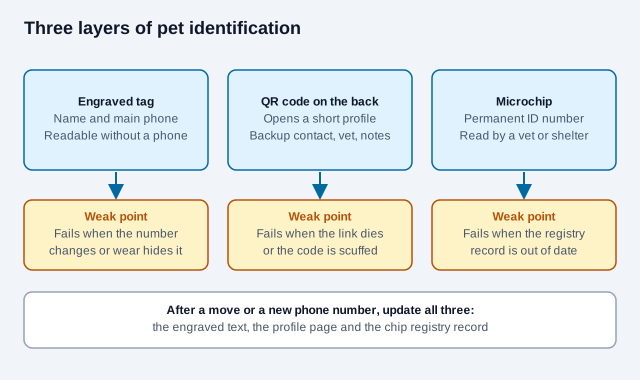
A QR code pet tag works best as a backup layer: the engraved tag carries the pet's name and a phone number, the microchip is the permanent identifier, and the QR code opens a short profile with the extra details that do not fit on metal. The profile should show only what a stranger needs to get your animal back to you, and every layer has to be kept current.
This guide covers what the QR code adds, how to host the profile for free or through a service, which tag materials wear best, how big the code needs to be, what to leave off the page for privacy, and what to do when the tag is scuffed or the link stops working.
What does a QR code add to an engraved pet tag?
A finder usually needs more than a name. A second contact number helps when you are on a plane or in a meeting. So does the name of a vet, a note that the dog needs daily medication, or a warning that the cat bolts if cornered. None of that fits on a small metal disc, and all of it changes over time. When a phone number changes, an engraved tag is wrong until you buy a new one, while a profile behind a QR code can be edited in a minute.
The speed matters too. A microchip is the permanent identifier and survives a lost collar, but a vet clinic or shelter with a scanner has to read it. A passer-by with a phone can scan a tag on the spot.
Is a microchip enough on its own?
No. The American Animal Hospital Association (AAHA) says a microchip paired with a collar and a current name tag raises the odds that a lost pet is returned. The chip holds an identification number, not a location, and it only helps if the registry record behind that number has your current contact details. An AVMA client brochure makes the same points: the chip carries no GPS data, and an unregistered chip cannot reunite you with your pet.
AAHA also runs a lookup tool that tells a vet or shelter which registry holds a given chip number. The tool does not store owner details, and owners cannot update a record through it. You update your record with the registry itself. Registries have also closed in the past, so check that yours still operates.
The QR code does not replace any of this. It sits between the other two layers: faster than a chip scan for a passer-by, and roomier than the engraving.
How can you set up a pet profile without a subscription?
Pet-tag companies typically host the profile for you and charge for premium features. Their plans and prices change, so read the current terms before you buy. Some, such as PetHub, also offer a free basic plan. If you would rather own the profile yourself, two do-it-yourself routes avoid a vendor entirely.
| Setup method | Cost | Who controls the data | Main risk |
|---|---|---|---|
| Published cloud document (Google Docs, Notion) | Free | You edit it directly | The link is public, so anyone who has it can read the page. Keep the contents minimal. |
| Page or redirect on your own domain | Domain registration and renewal | You, including where the QR code points | If the domain lapses, the tag stops working, and someone else could register it. |
| Pet-tag service with a hosted profile | Varies by service, some with a free tier | The vendor's portal | The tag depends on the vendor staying in business and keeping your plan active. |
| Static vCard in the QR code | Free | Stored in the symbol itself | You cannot edit it without making a new tag, and the contact details are readable by anyone with the tag. |
To build the free profile:
- Write a short document with the pet's name, a clear photo, a primary and a backup phone number, and the vet's contact details. Add medication or behavior notes only where they help a stranger keep the animal calm and safe.
- Publish it to the web so it opens on a normal HTTPS link without a login.
- Open the link in a private browser window to check what a stranger sees, including any account name or edit history the host exposes.
- Paste that link into our free QR code generator, choose error correction level H, and download the code.
A static code never expires, and a self-hosted page costs nothing to keep running. The part that can lapse is the page or domain it points to. If you want the option of moving the profile later without replacing the tag, point the code at a short address you control. Our guide to static and dynamic QR codes explains the trade-off, and why QR codes themselves do not expire covers where links actually break.
What should a pet profile page show, and what should it hide?
Anyone can scan a tag, and a link on the page can be shared. Treat the profile as public. One hosted-profile vendor, PetHub, describes a privacy setting in which a finder sees only the pet's name, photo and a hotline number, and the company relays the contact to the owner. That is a vendor description of its own product, so read the current terms of any service before relying on it. The same idea works for a do-it-yourself page: give a finder a way to reach you without giving them your life.
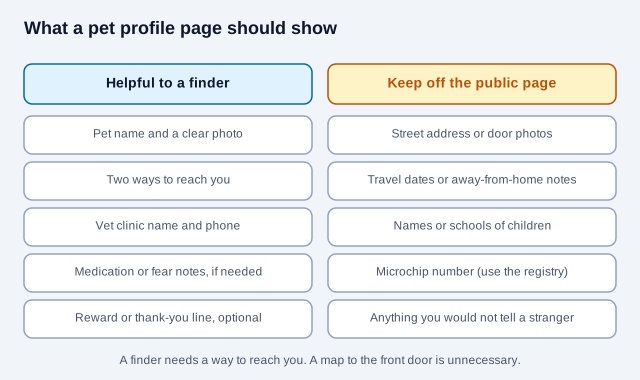
- Use a phone number or email you are comfortable having read by a stranger. A dedicated number or an alias address keeps your main inbox out of it.
- Leave your street address off the page. A finder needs a way to reach you, not a map to your front door.
- Skip travel notes such as "we are away until Friday". They tell a stranger when the house is empty.
- Keep children's names and schools off the page.
- Medical notes should be short and practical, such as "needs insulin twice a day". Add a vet contact for details.
- Some services email the owner the location of a scan. If you use one, check how the notice works and what the finder is told.
What should a pet tag be made of?
A collar tag rubs against a metal split ring all day and gets wet, muddy and sunlit. Marking method matters as much as the base metal, because a code that is only printed on the surface wears off first. The comparison below is a general guide based on how these finishes behave. Ask the supplier for wear data on the exact tag, and inspect it every few months.
| Material and marking | Wear resistance | Water and sun | Good for |
|---|---|---|---|
| Stainless steel with laser marking | Highest, because the mark is part of the metal | Does not rust; the mark does not fade | Active dogs, hunting breeds, outdoor pets |
| Anodized aluminum with laser marking | Good, but softer than steel and can scratch | Corrosion resistant and light | Small dogs, cats that go outdoors |
| Epoxy-domed tag | Good against knocks; the dome can scuff over time | Waterproof, but the resin may yellow in strong sun | Companion dogs and park walkers |
| Printed film on an acrylic tag | Lowest; edges can peel and chewing damages it | Water resistant | Short-term use, such as a foster animal |
How big should the QR code on a pet tag be?
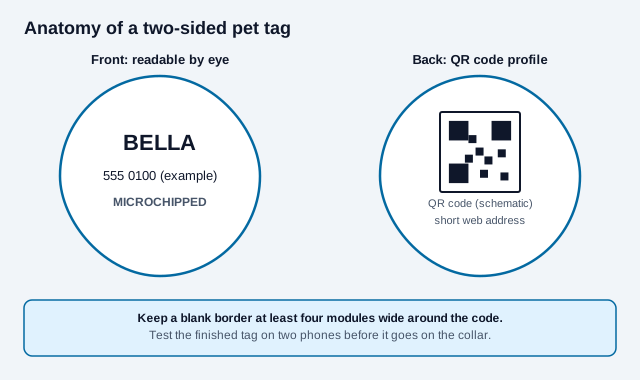
DENSO WAVE, the company behind the QR code, specifies a blank border of four modules on every side of the symbol (the quiet zone). On a small tag that border eats into the space, so plan for it when you choose a tag shape. There is no standard minimum size for a tag. A code about 20 mm (0.8 in) across is a commonly quoted starting point and already tight on a small tag, so treat it as a place to begin testing, not a rule.
- Shorter links make fewer, larger modules, which a phone focuses on more easily at close range.
- Use dark marks on a light, plain background. Engraving that shows up silver on silver can vanish in sunlight glare. Our QR code colors and contrast guide covers this.
- Choose error correction level H. It is designed to recover roughly 30% of the codewords, which gives the best margin on a scuffed tag. A scratch through one of the three corner squares can still stop a scan. See our guide to QR code error correction levels.
- Keep the tag light on a cat or a toy breed, and attach it to a breakaway collar so it cannot snag.
Scan the finished tag on two different phones before it goes on the collar, and again after a few weeks of wear. The QR scannability tester helps you check a proof image before you pay for engraving.
Why keep the phone number engraved as well?
A finder may have a dead battery, no signal or no smartphone. A double-sided tag covers both cases: engrave the pet's name and your main phone number on the front so it can be read at a glance, and put the QR code on the back for the detailed profile. Some owners also add the word "microchipped" so a finder knows to take the animal to a vet or shelter for a scan. Check that your microchip registration has your current number, since the chip is only as useful as the record behind it.
What happens when the tag is scuffed or the link dies?
Both failures are quiet. Nobody tells you the tag stopped scanning, and a profile that no longer loads looks the same to a finder as a broken tag.
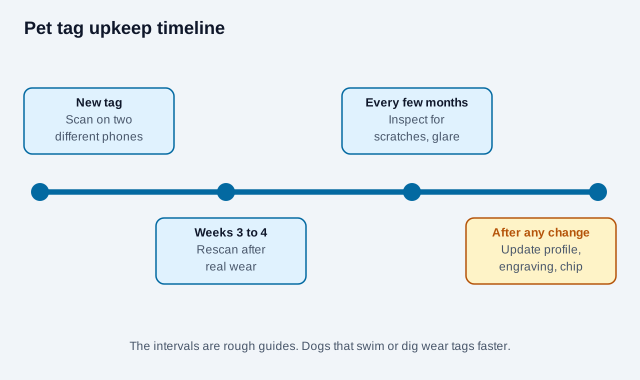
- Rescan the tag every few months, in daylight and indoors, on a phone that did not create it.
- If the mark is worn or the surface is scratched, order a new tag before the old one fails, not after.
- Open the profile link on mobile data, not only on your home Wi-Fi.
- If you use a vendor, keep your payment method current and note what happens to the profile if the plan lapses.
- If you move house or change your phone number, update the engraving, the profile and the chip registry together.
- If a tag is lost or found by someone else, disable or edit the profile so a stranger holding the tag learns nothing new.
How does a pet tag code go wrong?
Picture an owner who prints a QR code from a free generator onto a printed film tag, points it at a document that includes the home address and a note saying the family is away every August, and never scans it again. Within a season the film peels at the edges, and the document's sharing setting changes when the owner reorganizes a folder. A neighbor finds the dog and cannot scan the tag. The one thing that still works is the number on the front, and it is the old one because the owner changed carriers last spring. This is an illustration, not a real case, but each step is a failure that happens in practice: surface printing, an oversharing profile, no retest and a stale number.
What is a good pet tag checklist?
- Register the microchip and confirm the registry still operates.
- Engrave the name and main phone number on the front.
- Write a minimal profile and view it signed out.
- Generate the code at level H and keep the blank border intact.
- Choose a laser-marked metal tag if the animal is active.
- Scan on two phones, then rescan after a few weeks of wear.
- Set a calendar reminder to inspect the tag and check the registry.
Related reading: the print-size guide for sizing proofs, and the QR safety guide for how to check any code before you scan it.
What depends on your pet and local rules?
Local rules differ on microchip registration, licensing tags and what a public profile may contain, and some cities require a license number on the collar. No tag material has a guaranteed lifespan, and the privacy terms of hosted services change. Check your local animal-control rules and any service's current terms. This guide is general information and does not replace advice from a veterinarian or your local animal services office.
References
- AAHA: animal identification position statement
- AAHA: how to update microchip details
- AVMA: microchips client brochure (2022)
- PetHub: QR pet ID tags and privacy (vendor description)
- DENSO WAVE: QR Code area and quiet zone
- DENSO WAVE: QR Code error correction
- ISO/IEC 18004:2024, QR code bar code symbology specification
- PetHub: plans and pricing (example of a hosted pet-tag service)