Your WeChat QR code is in the app under Me: tap your name or profile photo, then tap My QR Code. To scan someone else's, tap the + button at the top of the Chats screen and choose Scan, or go to Discover > Scan. That covers most searches for a WeChat QR code. The rest of this guide covers what people get stuck on: scanning a code from a screenshot, group codes that stop working, why your phone camera can't add a friend, and the "help me verify my account" request you should usually turn down.
Menu names change between WeChat versions and differ slightly between iPhone and Android. If a label below doesn't match your screen exactly, look for the closest wording in the same place.
- Where is my WeChat QR code?
- How do you scan a QR code in WeChat?
- How do you scan a WeChat QR code from a photo or screenshot?
- What kinds of QR codes does WeChat use?
- Why did my WeChat group QR code stop working?
- Can you scan a WeChat QR code without WeChat?
- Is it safe to share or scan WeChat QR codes?
- Can you put a WeChat QR code on a card or poster?
Where is my WeChat QR code?
Your personal code lets other people add you as a contact without typing your WeChat ID or phone number. To open it:
- Open WeChat and tap Me in the bottom bar.
- Tap your name or profile photo at the top. On some versions there's a small QR icon next to your WeChat ID that goes straight there.
- Tap My QR Code.
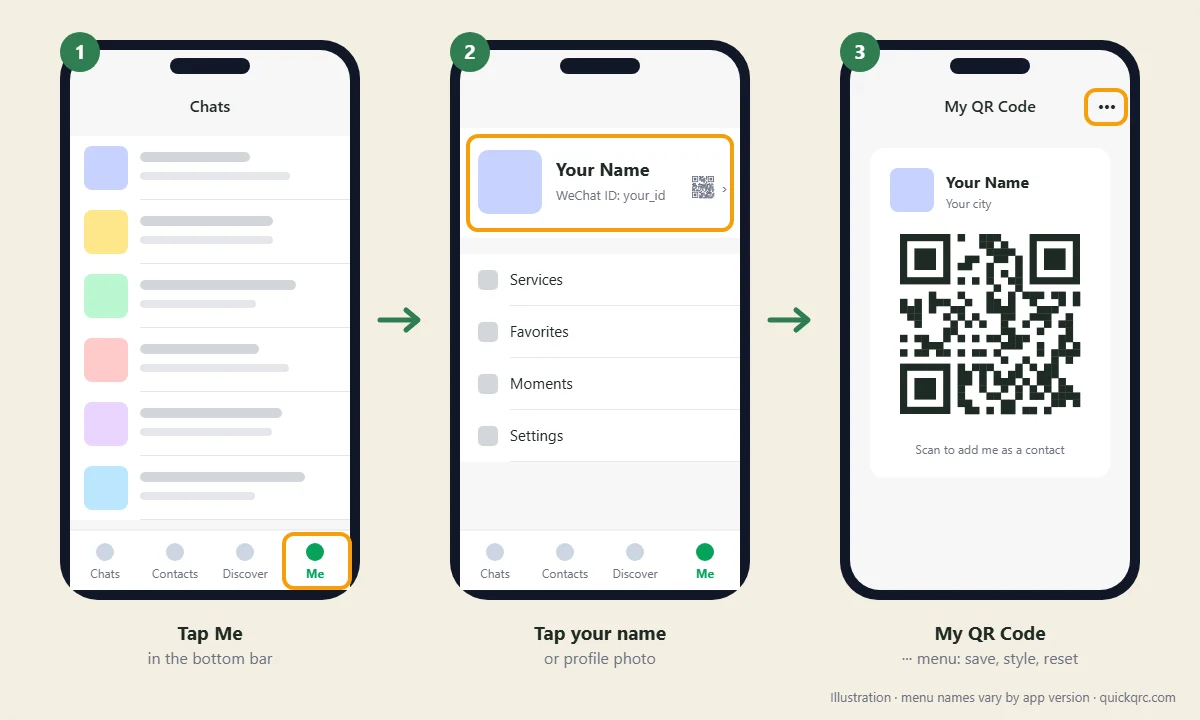
The three-dot menu at the top right of that screen lets you save the code to your photos, share it, change its background style and, on most versions, reset it. Resetting gives you a new code and the old one stops working, which helps if your code ended up somewhere you didn't want it, such as a public group or an old flyer.
A saved image of your code works just like the one in the app. Anyone who scans the screenshot can send you a friend request, so treat it like your phone number and don't post it anywhere you wouldn't post that. If it appears in a screenshot you want to share, hide it first with the blur QR code tool.
How do you scan a QR code in WeChat?
WeChat's scanner is built into the app, and there are two routes to it:
- From Chats: tap the + in the top right corner, then Scan.
- From Discover: tap Discover in the bottom bar, then Scan.
Point the camera at the code and hold the phone steady. WeChat acts on it straight away: a personal code opens that person's profile with an Add to Contacts button, a group code opens a page where you can join, and a payment code opens the payment screen. Ordinary QR codes that hold a website link open the page in WeChat's built-in browser.
If the scanner won't pick a code up, the usual fixes are the same as for any QR code: more light, moving the phone back so the whole code including its margin is in frame, and wiping the lens. Our QR code not scanning guide goes through the full checklist.
How do you scan a WeChat QR code from a photo or screenshot?
This is the question behind a lot of WeChat searches, because the code is often sent to you rather than shown to you in person. You can't point your own phone's camera at its own screen, so WeChat gives you two other ways:
- From your photo album: open the scanner as above, tap the album or photos icon (usually in the bottom corner of the scanning screen) and pick the screenshot. WeChat reads the code from the saved image.
- From inside a chat: if someone sent the code as an image in a WeChat conversation, open the image and press and hold it. A menu appears with an option to scan or extract the QR code.
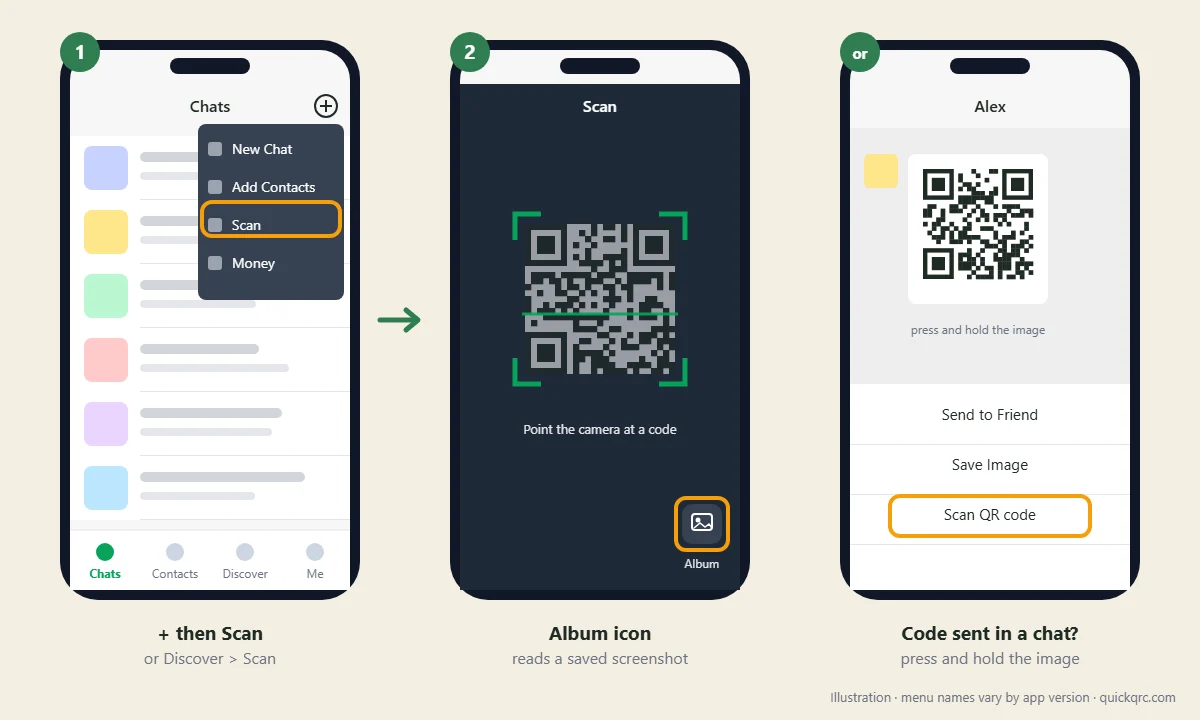
When a screenshot won't read, it's usually because the code is too small or blurry in the image, or part of it is cropped off. Ask for a fresh screenshot with the code filling more of the screen. If you're on a computer, you can also show the image full screen on the monitor and scan it with your phone.
What kinds of QR codes does WeChat use?
Not every code you see in WeChat does the same job, and some of them expire. Knowing which one you have explains most "it worked yesterday" problems.
| Code | Where to find it | What scanning it does | Does it expire? |
|---|---|---|---|
| Personal QR code | Me > your profile > My QR Code | Opens your profile so the scanner can send a friend request | No, until you reset it |
| Group QR code | Open the group chat > three-dot menu > Group QR Code | Opens a page to join the group | Yes, after 7 days, and large groups switch to invitations |
| Payment codes | Me > Pay or Services > Money (receive money, or the payment code a shop scans) | Sends or requests money | The pay-a-shop code refreshes constantly; a printed receive-money code doesn't |
| Desktop login code | Shown by WeChat for Windows, Mac or WeChat Web | Signs that computer in to your account after you confirm on the phone | Yes, within minutes |
| Mini Program code | On posters, menus and packaging, often round rather than square | Opens a mini app inside WeChat | Depends on the business |
| Ordinary QR code with a link | Anywhere | Opens the website in WeChat's browser | Only if the website goes offline |
The round Mini Program codes are worth a note. They look a bit like a sunflower and aren't standard QR codes at all, so only WeChat can read them. A generic QR scanner app or your phone's camera will ignore them.
Why did my WeChat group QR code stop working?
Almost always because it expired. WeChat's help center says a group QR code is valid for 7 days. The expiry date is printed under the code when you open it. After that, scanning it shows an error instead of the join page, even though the image looks exactly the same.
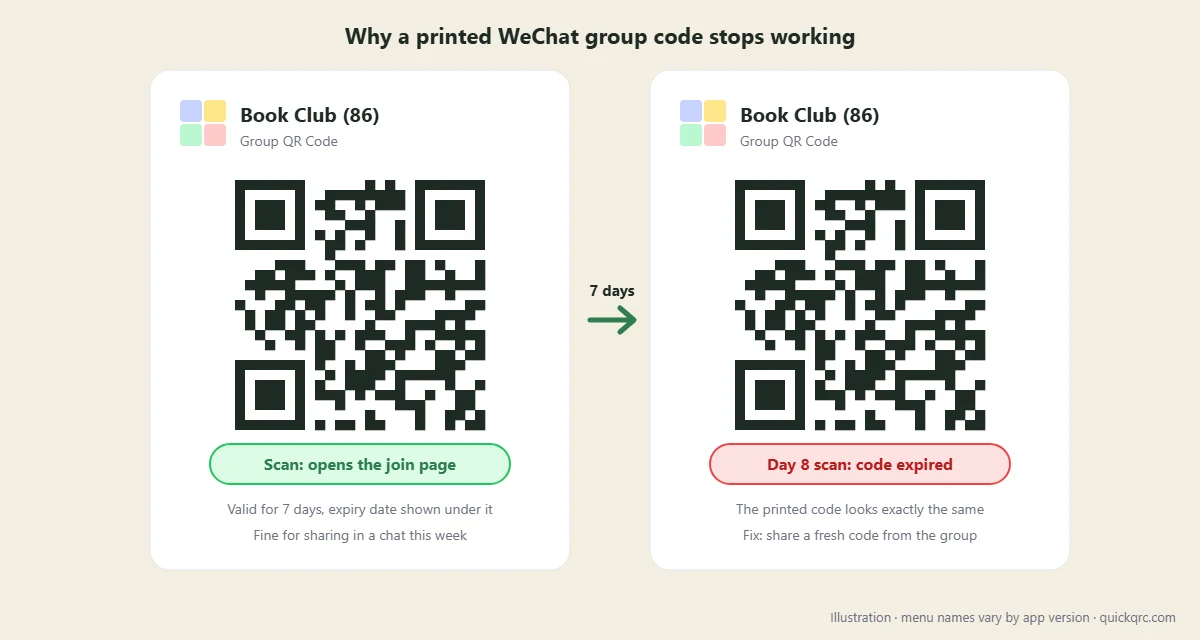
The fix is to open the group, go to Group QR Code again and share the new code. That has a practical consequence: a group QR code is a bad thing to print. Put it on a poster, an event slide or a newsletter and it stops working a week later. For anything that has to last longer, share your personal code and add people to the group yourself, or ask the group owner to invite them.
Group size matters too. According to WeChat's help center, once a group passes 40 members new people are invited rather than added directly, and past 100 members joiners have to complete identity verification. If your group is large, some people may get further than the scan and then hit one of those steps.
Can you scan a WeChat QR code without WeChat?
You can read it, but you can't use it. Your iPhone or Android camera will decode most square WeChat codes, because they're standard QR codes that hold a web link on a WeChat domain. Opening that link in a normal browser doesn't add a friend or join a group, though. You'll typically land on a page asking you to open it in WeChat or to download the app. Adding contacts, joining groups and paying all happen inside the app, tied to a signed-in account.
If you only want to see what a code contains before deciding what to do with it, for example whether a "WeChat" code someone sent is really a WeChat link, our QR payload decoder shows the raw contents without opening anything. You can also read it with the online QR code scanner. For a general walkthrough of the phone camera method, see how to scan a QR code.
Is it safe to share or scan WeChat QR codes?
Sharing your personal code is about as risky as sharing your phone number: it lets strangers find you and send requests. Scanning other people's codes is mostly safe, with three exceptions worth knowing.
- Login codes. Only ever scan a WeChat login code that is on a computer in front of you. If someone sends you a login code, or asks you to scan one "to verify" something, scanning and confirming it can sign them in to your account. WeChat asks you to confirm on the phone for this reason, so read that screen before tapping.
- "Help me verify my account" requests. New WeChat accounts are sometimes asked for an existing user to scan a code to confirm the new person is real. That is a genuine feature, but helping a stranger with it vouches for an account you know nothing about, and accounts later used for spam have been reported to cause trouble for the person who verified them. Do it for people you actually know.
- Payment codes from unknown sources. Check the name shown on the payment screen before you pay, the same way you would with any QR code payment. A sticker pasted over a shop's real code is a known trick with QR payments generally.
Our guide to QR code scams covers the wider pattern. If you've posted your personal code somewhere public and are getting unwanted requests, reset it from the My QR Code screen. You can also turn off adding by QR code in WeChat's privacy settings, under the list of ways people can add you.
Can you put a WeChat QR code on a card or poster?
Yes, with your personal code or a business's official account code, because those don't expire. Save the code from the app at full size rather than taking a cropped screenshot, and keep the white margin around it. Print it no smaller than about 2 cm (0.8 in) across for something held in the hand, and larger for anything read from a distance. Our QR code print size guide has the distance rule.
Don't print a group code, for the 7-day reason above. And don't redraw or restyle the code in a design tool. Changing colors, adding a logo or swapping the module shapes can break it, and you can't regenerate a WeChat personal code yourself because only WeChat knows what it should contain. If you need a card that also links to your website or other profiles, add a second, separate QR code made with a URL QR code generator rather than editing the WeChat one. Check the finished design with the QR code validator before you print a batch.
Steps were checked against WeChat's help center and current app guides in October 2026. WeChat renames menus between versions, so if something here doesn't match your app, tell us through the contact page and we'll update it.