A QR code on a gravestone, headstone or memorial plaque can send visitors to an online page with photographs, recordings and family history, but the code only stays useful if the web address inside it keeps working for decades. Encode an address on a domain your family owns, redirect it to wherever the memorial currently lives, and get the cemetery's permission before anything is engraved.
A stone has room for a name, two dates and a line or two of text. The code lets the family add the rest without touching the inscription. This guide covers what to link to, how to keep the link alive, which materials and sizes work, how to check cemetery rules, what to keep off a public memorial page, and what to do if the code fades or the link breaks.
What can a memorial QR code link to?
Traditional headstones carry a name, birth and death dates and a short epitaph. A code can lead to a life story, a voice recording, a video, or the historical context a genealogist would want. Cemetery visitors and family researchers scan it with an ordinary phone camera and land on the page. Relatives can keep adding things, such as newly found photographs, tributes and messages from people who cannot visit, while the stone stays as it is.
How do you keep a memorial code working for decades?
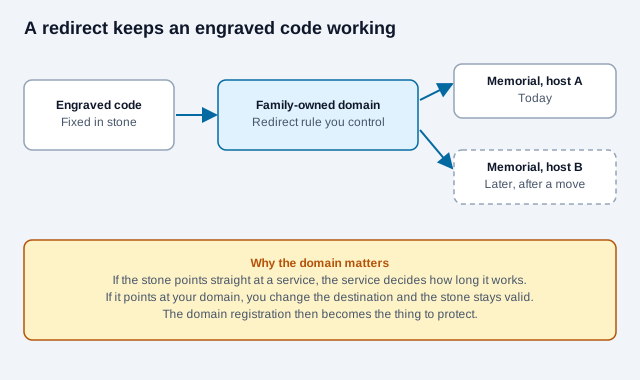
Put a web address you own inside the code and have it redirect to wherever the memorial currently lives. Do not engrave the address of a memorial startup. Companies get sold, change their pricing or shut down, and an engraved code cannot be edited. If the code points at your own domain, you can repoint it to a new host at any time.
| Where the code points | What you have to maintain | What can go wrong |
|---|---|---|
| Your own domain, redirecting to the current memorial page | Domain renewals, with auto-pay and a backup contact on the registrar account | A lapsed registration; someone else can then register the address |
| A cloud document or shared album directly | Account access and sharing settings | The link breaks if the file is moved, deleted or has its sharing changed, and account access can become a problem after the owner has died |
| A commercial memorial website | Subscription and plan terms | The service changes terms, raises prices or closes, and the engraved address goes dead |
| A social media memorial page | A legacy contact set up on the platform | Interface changes, login walls and policy changes outside the family's control |
To set up the redirect route:
- Register a domain, for example a family name followed by a short suffix, with a registrar that allows multi-year renewal and auto-pay.
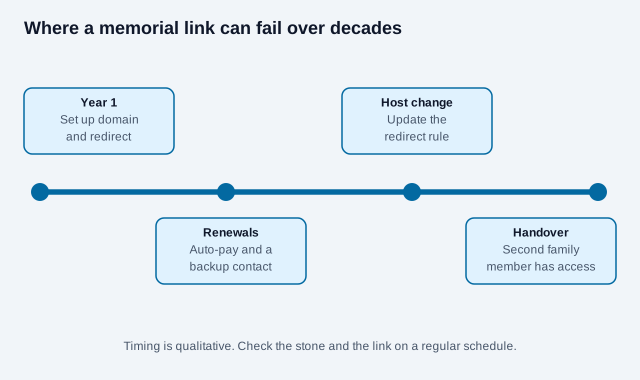
- Configure the domain to redirect (a permanent 301 redirect works) to your current memorial page. If you change hosts later, you update the redirect and every stone keeps working.
- Paste the domain into our free QR code generator, choose error correction level H, and export an SVG for the engraver.
- Scan the exported file on two phones and confirm the redirect lands on the right page.
A static code never expires. The part that can lapse is the domain. Our article on whether QR codes expire explains the difference, and static versus dynamic codes covers when a managed redirect helps. A self-run redirect on your own domain gives you the same flexibility without depending on a vendor.
What happens if the domain lapses?
ICANN's guidance for registrants says that when a domain is not renewed or restored in time, it may be released for registration on a first-come basis. That means a stranger could register the address printed on your stone and put anything behind it. Renewal terms also have limits: registrars sell terms in one-year steps, and the remaining term is generally capped at ten years, so permanent prepayment is not an option. Check your registrar's policy.
- Turn on auto-renewal and keep a current card on file.
- Use a contact email that more than one family member can read.
- Write down the registrar, the account holder and the renewal date, and tell a second relative where the note is.
- If the registrar offers it, add a registrar lock so the domain cannot be transferred by mistake.
- If a domain is ever lost, contact the registrar quickly. Restore windows after expiry exist but vary by registrar.
Which materials suit an engraved memorial code?
Outdoor monuments face rain, moss, freeze and thaw cycles and strong sunlight. Contrast is the main issue: a code has to read as dark and light modules, and some stones do not give you that.
| Material and method | Contrast and durability | Upkeep |
|---|---|---|
| Laser etching on dark granite | Etching turns the dark stone pale, so etch the background and leave the modules dark; an inverted, light-on-dark code is not read by every scanner. Granite is very hard and weathers slowly. | Soft brushing to clear lichen and dirt |
| Porcelain enamel plaque | Glazed surface that does not fade in sunlight and resists scratching | Wipe with water |
| Laser-marked stainless steel plaque | High contrast and resistant to rust, provided the alloy is suited to outdoor use | Occasional wash with mild detergent |
| Cast bronze plaque | Develops a patina over time, which can lower contrast | May need periodic cleaning or sealing |
| Outdoor adhesive decal | Curls, yellows and peels in sun and weather | Frequent replacement; a stopgap only |
Ask the monument maker for the expected lifespan of the exact material and marking process they use, and get it in writing if the family is paying for permanence. Lifespan figures vary widely by stone, finish and climate, so do not rely on a general number. Vendor claims of "50 years or more" for a particular plaque are marketing until you see test data or a written warranty.
How large should the code be, and what error correction should it use?
Bigger is easier to scan, and visitors should not have to step onto a plot or kneel to do it. A few points to settle with the engraver:
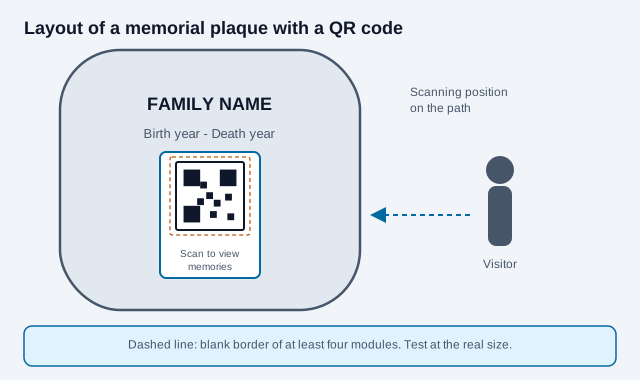
- Keep a blank border of at least four modules around the code, as DENSO WAVE specifies for the quiet zone. Text, carving or edging inside that border can stop the scan.
- Use error correction level H. It is designed to recover roughly 30% of the codewords, which gives the best margin against gradual soiling from dirt, leaves, bird droppings and mineral deposits. Keep the code clean anyway, because damage over one of the three corner squares can still stop a scan. See the error correction levels guide.
- Make the light and dark modules as different in brightness as you can. On pale granite or porous sandstone, direct carving gives weak contrast, so a dark porcelain or metal medallion may work better. Our article on QR code colors and contrast explains why.
- Give the engraver a vector file, such as an SVG, so the module edges stay sharp when they are cut.
- Test a printed or proof version at the real size, and scan it from where a visitor would actually stand. The print-size guide explains how distance and size relate.
What should you check with the cemetery?
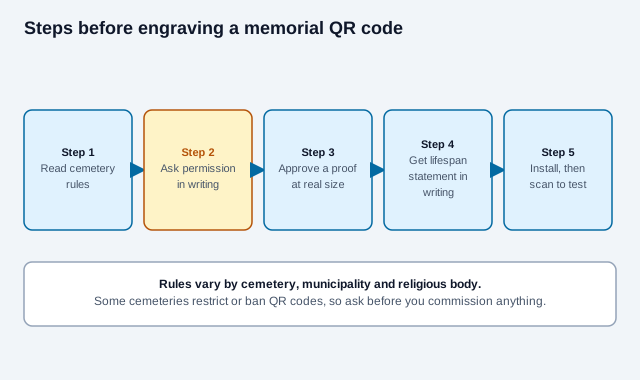
Check the cemetery's rules before you commission the engraving. Some historic and churchyard cemeteries restrict the symbols, lettering and attached hardware allowed on a monument, and a rule discovered after engraving is an expensive one. Rules are not standardized. One memorial vendor reports that common limits include a maximum plaque size, often around two inches, but that is a vendor statement and your cemetery's written rules are what count.
Government and military cemeteries have their own policies. A 2014 news report said Arlington National Cemetery had not lifted its policy banning QR codes, and members of the US House have since written to ask that QR codes be allowed on grave markers for service members. The current Arlington position could not be confirmed from an official page for this guide, so ask the cemetery directly.
Add a short, respectful line next to the code, for example "Scan with a phone camera to view family memories." It tells older visitors what the code is for and suits the setting.
What should a public memorial page leave out?
A memorial page is a public web page. Anyone who scans the stone or finds the address can read it, and search engines may index it. Think about what the family would be comfortable with years from now.
- Leave off details that help impersonation, such as a full birth date together with a mother's maiden name or a home address.
- Ask living relatives before posting their photographs or names, especially children.
- If you add a guestbook, decide who moderates it and how spam gets removed.
- Keep a contact route for corrections that is not a personal inbox.
How does a memorial code go wrong?
Take a family that engraves a link to a memorial startup because the first year was free. Eight years later the service is sold and the old pages are deleted. The code on the stone still scans perfectly and opens an error page. Another family prints a link to a photo album in a personal account, and after the account holder's death nobody can sign in to change the sharing setting, so the page quietly stops loading for visitors. This is an illustration, not a real case, but the same two failure modes, a vendor's lifetime and a single person's account, are why the redirect on a family-owned domain with shared access is worth the setup effort.
What is a rollout checklist?
- Read the cemetery rules and get permission in writing.
- Register the domain and set up auto-renewal with a shared contact.
- Create the memorial page and view it signed out.
- Set the 301 redirect and generate the code at level H as an SVG.
- Approve a proof at the real size and scan it from the visitor position.
- Get the maker's lifespan statement for the exact material in writing.
- After installation, scan the finished stone on two phones.
- Check the stone and the link every year, and when ownership of the domain account changes.
What depends on the cemetery and the family?
Cemetery regulations, local monument rules and the durability of a particular stone or plaque differ, and this guide cannot tell you which apply to you. Memorial vendors' durability claims are not independently verified here. Domain and data-protection rules vary by country. Check with the cemetery, the monument maker and, for the legal side of a deceased person's accounts and records, a qualified professional. This guide is general information, not legal advice.
References
- DENSO WAVE: QR Code area and quiet zone
- DENSO WAVE: QR Code error correction
- ICANN: what to do when a domain name expires
- ICANN blog: do you have a domain name? What you need to know
- Anchorage Daily News (2014): cemetery seeking to expand use of QR codes on markers
- Rep. Mike Thompson: letter urging QR codes on grave markers
- Memorygram: QR codes on headstones and cemetery rules (vendor blog)
- ISO/IEC 18004:2024, QR code bar code symbology specification