A QR code on a hiring sign should open one specific job page, or a short mobile application, in a single scan. Tag each placement with its own link, size the code for the real viewing distance, and test the full application on a phone.
The scan is the easy half. Nearly everyone who scans will be on a phone, so the page behind the code decides whether you get an application. This guide covers where recruiting codes work, how to build and tag them, what the phone experience should look like, how large the code must be, what to print beside it, and the failures that turn up most often. It suits shop owners, HR coordinators and anyone staffing a career fair.
Why put a QR code on a hiring sign?
People read a hiring sign while they are standing in front of it, which is when they are most interested. Asking them to remember a link or search a careers site loses many of them. A scan takes them straight to the right listing before they walk away.
| Where you hire | Where the code goes | Where it should point |
|---|---|---|
| Retail store or restaurant | Window decal, counter stand, receipt | A short application or talent-pool form |
| University career fair | Banner, table runner, flyer | An internship or entry-level landing page |
| Trade show or expo | Booth backdrop, lanyards, brochures | A page listing open roles by department |
| Bus shelter, poster or yard sign | The poster itself | A page for that location's jobs |
| Postcards and print ads | Corner or footer of the ad | A tagged link so you can see which ad worked |
For event-based hiring, the events guide and the education guide cover the surrounding signage. If you are the applicant rather than the employer, see the resume QR code guide.
How do you make a QR code for a job posting?
- Copy the exact link to the job from your applicant tracking system (ATS), such as Greenhouse, Lever, Workday or BambooHR, not the general careers homepage.
- Tag the link with the UTM builder, using values such as
utm_source=storefront_window&utm_medium=qr&utm_campaign=q3_hiring, so your analytics can tell one placement from another. - Turn the tagged link into a code with the URL QR code generator. Level M error correction is enough for a clean flyer; pick Q or H if a logo will sit in the middle (see error correction levels).
- Export an SVG so the edges stay sharp at any size.
- Add a short instruction next to the code, such as "Scan to apply," and a typed address.
- Print a proof and scan it on both an iPhone and an Android phone, in the light where the sign will hang.
If the job may close or the ATS link may change, put a redirect on your own domain, such as company.example/jobs/retail, and encode that address. You can repoint it without reprinting. The static vs. dynamic guide explains when a managed redirect is worth paying for.
How do you track which placements work?
Make a separate code for each place you hire: one for the front window, one for the receipt, one for the campus bulletin board. Give each its own UTM values, and your web analytics or ATS source reporting will show how many candidates came from each. Static codes are enough, because the tracking lives in the link's parameters.
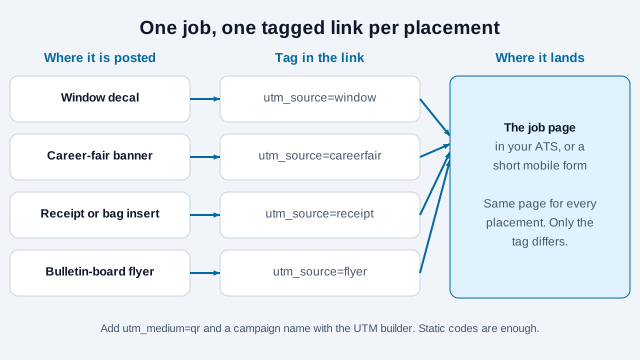
The trade-off is that a static code cannot be repointed once printed, which is why the redirect on your own domain matters. Tagging tells you which sign produced a visit, not who the person was, so keep the reporting at the placement level. The tracking guide compares options and their privacy limits.
What should the application page look like on a phone?
A candidate scanning a sign cannot easily attach a resume from a laptop or fill in thirty fields on a small screen. Keep the first step short. Older survey data shows why this matters: a 2014 Glassdoor survey found that 69 percent of respondents found it easier to apply from a desktop or laptop, that 38 percent said many career sites were not mobile-optimized, and that 25 percent were less likely to apply if the career site was not mobile-friendly. The data is dated, so treat it as direction. Your own funnel numbers from the ATS are better evidence.
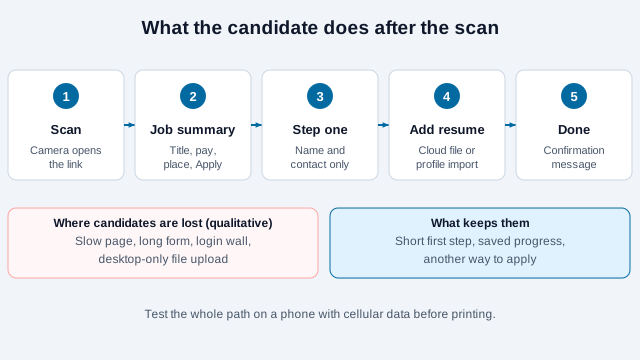
- Show the job title, location, pay where you can, and an Apply button before any form.
- Let people import a profile or pick a resume from cloud storage such as Google Drive, Dropbox or Apple Files, instead of requiring a file from the phone itself.
- Ask for basic contact details first, so you keep a lead even if the candidate does not finish at once.
- Keep the page light. People scanning at a bus stop or a busy expo often have a weak mobile connection.
- Follow WCAG for contrast and labeling, and offer another way to apply, such as a phone number or an HR email.
How large should the code be?
A common rule of thumb is to make the code about a tenth as wide as the distance it will be scanned from. A window decal read from 75 cm (30 in) should start at about 7.5 cm (3 in) across. The rule comes from printing practice and not from the QR standard, so use it for a first proof and then test.
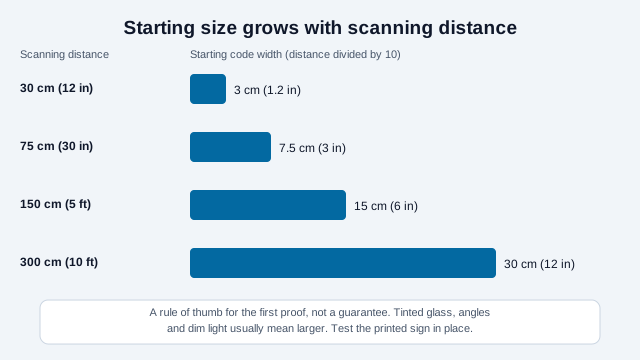
Tinted or double-glazed glass, an angle, or poor light usually calls for a bigger code. Our print size guide has a table for common placements, and the blank border around the code should be at least four modules wide. A short destination address produces a coarser code that scans from further away.
What should sit around the code?
A code on its own is a mystery. Give people enough to decide and a fallback.
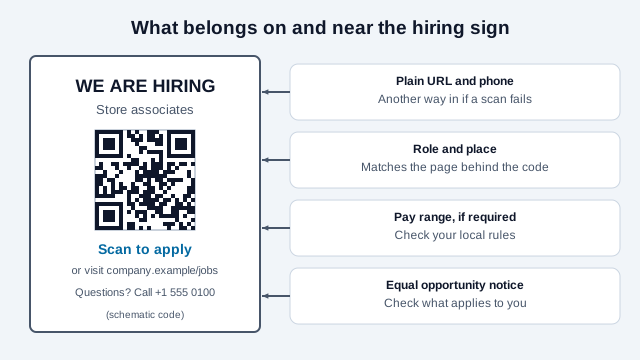
- A typed address and a phone number, for people who cannot or will not scan. This also helps candidates who use assistive technology; see the accessibility guide.
- The role and place, matching the page behind the code.
- Pay information if your location requires it in job postings. Several US states and cities require pay ranges in postings, and compliance-vendor guides disagree on counts and thresholds, so check your state labor department rather than relying on a summary.
- Equal employment notices. The EEOC says covered employers must display its "Know Your Rights" poster where notices to applicants and employees are normally posted, encourages posting it on the website as well, and treats electronic posting as the only option for employers without a physical location. A QR code on a sign does not replace that poster.
Scam awareness is part of design too. The FTC lists signs of job scams, including requests to pay for a job and checks that must be partly returned, and notes that legitimate employers do not charge applicants. A sign that points to a clearly branded domain, with your name on it, is easier to trust. Keep your own signs from being tampered with: a sticker placed over a real code is the usual trick, and the quishing guide shows what to check.
What goes wrong with recruiting QR codes?
| Problem | Likely cause | Fix |
|---|---|---|
| The scan opens a 404 page | The job was closed or the ATS link changed | Encode a redirect on your own domain that you can update |
| The camera will not pick up the code in a shop window | Sun glare or reflection off the glass | Use an anti-glare film, or mount the code on an opaque white card |
| Lots of scans but few finished applications | The form needs a desktop upload or a login | Shorten step one and allow profile or cloud imports |
| The code looks soft on a printed flyer | A small raster image was scaled up | Export an SVG and print it at full size |
| It will not scan in a dim hall | Low contrast between code and background | Use dark modules on a plain white background and avoid pale brand colors |
Consider a pizza shop that prints one "We're hiring" decal and puts it on the front window, the delivery bags and a bulletin board at a nearby college, all with the same link. Applications come in, but nobody can say which placement works, and the window decal is read from the sidewalk at about 1.5 m (5 ft) while it is only 5 cm wide. The fix is three tagged codes, a window decal sized from the distance rule, and a test from the sidewalk. The same shop later closes the delivery-driver role, and the old link shows an error until the owner redirects it. Use the scannability tester on the artwork before it goes to print.
What is the checklist before you print?
- The link works on Safari on iPhone and Chrome on Android.
- The form can be completed from start to finish on a phone.
- Each placement has its own UTM tags.
- There are at least four modules of clear space on every side, and strong contrast.
- A short instruction, a typed address, a phone number and your company name sit beside the code.
- The finish is matte, so overhead lights do not cause glare.
- You have scanned a printed test from the farthest distance people will use.
- Someone owns closing the redirect when the role is filled.
Which hiring rules depend on where you recruit?
Pay-range, posting and notice rules vary by place and change often, so confirm what applies to each location where you hire. No reliable recent figure turned up for how many candidates abandon a mobile application, so measure your own. The one-tenth distance rule is a starting point and does not guarantee a scan through tinted glass. And whether a hiring sign should carry a code at all depends on your candidates; some applicants will always prefer to walk in and ask.
This page is general information, not legal or HR advice. Check the employment, posting and accessibility rules that apply where you hire.
References
- ISO/IEC 18004:2024, QR code bar code symbology specification
- W3C Web Accessibility Initiative: WCAG
- U.S. EEOC: updated "Know Your Rights" poster
- U.S. FTC Consumer Advice: job scams
- DENSO WAVE: determining the code area and quiet zone
- eWeek: smartphones and tablets play an expanding role in job searches (2014 Glassdoor survey figures)
- Clockspot: pay transparency laws by state (vendor guide, shows that counts differ)