A QR code on stationery should lead somewhere that will still exist when the last box of paper runs out. Letterheads, envelopes and compliment slips can sit in a cupboard for years, so the address behind the code matters more than its color or logo. Start with a page on your own domain, put the code in a footer or corner clear of the folds, and print a test sheet before ordering the full run.
This guide covers what each stationery item is good for, which kind of code lasts longest, where it fits, how to keep it sharp in office printing, and what a code cannot replace.
Which stationery is worth putting a code on?
Stationery reaches people who already have a reason to deal with you, so a code works best as a shortcut to the next step of that relationship. It is a poor place for a general brand message. Vendor guides mostly suggest a contact card or website link on letterheads, but a specific task will usually give the reader a stronger reason to scan.
| Item | Good reason to scan | Starting width | Placement |
|---|---|---|---|
| Letterhead | Book a call, view a proposal, reach the right team | 2 to 2.5 cm | Footer, printed in the template |
| Compliment slip | Reorder, register a warranty, leave feedback | 2 to 2.5 cm | Right side, beside a short prompt |
| Envelope | Rarely needed; a tracked offer or event page at most | 2 cm | Back flap, or beside the return address |
| Notepad | Reorder page or contact page | 2 cm | Foot of each sheet |
| Invoice or statement | Open your own payment page or the customer portal | 2.5 cm | Next to the amount due |
| Presentation folder | Case studies or a digital copy of the contents | 3 cm | Inside pocket or back cover |
Widths are our starting points, based on the 10:1 distance rule of thumb and the in-hand figures in our placement guide. They are not a standard. A long URL needs more modules, so check it against the print size guide.
Which code lasts longest on printed stationery?
The most durable setup is often a static code pointing to a short path on your own domain, such as example.com/hello. You can redirect that path whenever your site changes, and it keeps working for as long as you hold the domain. No QR platform needs to stay in business, and no subscription needs to stay paid.
That runs against the common advice to use a dynamic QR code for anything expensive to reprint. A dynamic code is still the better choice when you want scan logs or have no way to set up redirects on your domain. Weigh that against its dependency: the printed code relies on the provider keeping the redirect live, so check what happens if a plan lapses. Our guide on whether QR codes expire covers this in detail.
- Your own domain with a redirect: best for letterheads and anything printed in bulk.
- Dynamic code: best when scan data or vendor-managed changes matter more than independence.
- Plain static link to a stable page: fine for short runs and small offices.
- A full contact card stored in the code: avoid on shared stock, because details change and the extra data makes the code denser.
Printing for a team? Link to a role or team page, because a code that names one employee goes stale when that person leaves. If each person needs their own version, the bulk generator can create a set, and a vCard QR code suits personal stock such as business cards better.
Where does the code go on a letterhead or envelope?
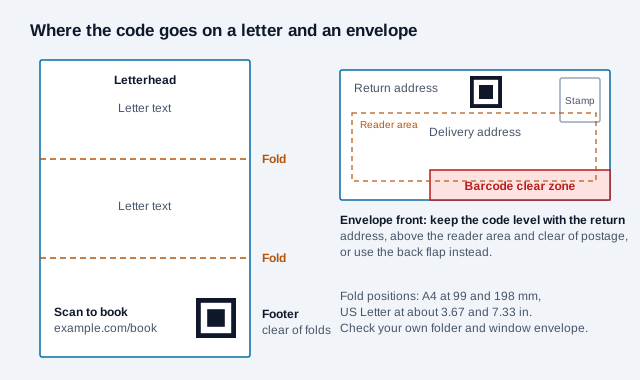
Plan around the folds first, because a crease through a code often stops it reading. A letter folded in thirds creases at 99 and 198 mm on A4, and at about 3.67 and 7.33 in on US Letter. The footer normally sits clear of both, and it stays out of the way of a long letter. Use the same position on every sheet.
We simulated this with a white band across a short-link code, moved through every row, and decoded each result with the jsQR library. A 2.5 cm code with quiet zone has modules of about 0.7 mm, so a band two modules wide is about the width of a worn fold.
| Error correction | Crease 1 module wide | 2 modules wide | 3 modules wide |
|---|---|---|---|
| L | 7 of 25 positions read | 0 of 24 | 0 of 23 |
| M | 18 of 29 | 6 of 28 | 0 of 27 |
| Q | 19 of 29 | 7 of 28 | 2 of 27 |
| H | 25 of 33 | 17 of 32 | 14 of 31 |
Two lessons follow. Error correction helps, but even level H failed at about half the positions once the band reached two modules, so moving the code beats relying on recovery. If a code might get folded anyway, as on a compliment slip stuffed into an envelope, use level H and accept the slightly denser pattern. This was one decoder on clean bitmaps with a simulated line, not real folded paper, so scanning a real fold can go better or worse.
Keep four modules of clear space around the code, as ISO/IEC 18004 specifies, and do not let it touch a footer rule or a pale background pattern. Print the prompt beside it, along with a short web address for anyone who prefers to type it.
Envelopes need more care. The USPS Domestic Mail Manual defines a barcode clear zone in the lower right of letter-size mail, reaching 4¾ in from the right edge and ⅝ in up from the bottom, and requires clear space for the address, postage and mail markings. It also recommends keeping the delivery address inside an optical character reader area that runs from ⅝ in to 2¾ in above the bottom edge, with ½ in margins at the sides. On a business envelope that band covers most of the front, so "under the return address" can land inside it. Put the code on the back flap, or level with the return address at the very top left. Outside the US, ask your postal operator, and test window envelopes with the letter folded inside so the code does not show through or end up in the window.
How do you keep the code sharp in office printing?
Pre-printed stationery is the easy case: give the printer an SVG or another vector file. Word templates get the most warnings online, because Word compresses pictures by default, commonly to 220 ppi according to third-party guides. In our test that was not a real problem at this size: a 2.5 cm code downsampled to 220 ppi kept 4 to 6 pixels per module and decoded with both a short and a 105-character URL. Even 96 ppi decoded, though with less than 3 pixels per module we would not rely on it. The bigger risks are a code enlarged after pasting, or a logo or footer rule crowding its margin. Turning compression off takes a minute, so do it anyway.
- Export a PNG at 600 pixels or more for a 2.5 cm code, or an SVG if your version of Word accepts one.
- In Word, open File, Options, Advanced, and turn on "Do not compress images in file" under Image Size and Quality. Set the target output to its highest option. Menu names vary by version.
- Place the image in the document footer so nobody can drag it by accident, and lock its size.
- Export a PDF, print it on the real paper and printer, and scan the printout with two phones.
Textured and uncoated papers can make printed edges less crisp, so print on the actual stock before approving the run. Keep the code black on white or on a very pale tint, and read the printing guide if your printer asks about color or file setup. We have not tested real paper stocks, so your own proof is the evidence that counts.
Can you put a payment QR code on invoices?
Yes, and it is the most practical stationery use, but it needs the most care. Link to a payment page on your own domain or your payment provider's, and keep the full written bank details on the invoice so a customer can check them. A separate route also helps people who cannot or will not scan.
The risk is tampering. The FTC warned in December 2023 that scammers hide harmful links in QR codes and advised people to inspect a URL before opening it. Print your domain beside the code so customers know what to expect, send invoices through a channel they trust, and make sure the amount and payee shown after scanning match the paper invoice. In the Single Euro Payments Area, a bank-readable EPC payment code can carry the payee and amount directly; see our guide to accepting QR code payments.
A code on invoices does not change what the invoice must legally say. Check your country's tax and invoicing rules with your accountant.
Should each recipient get a personal code?
Usually not. A generic code tells you that someone scanned a letterhead. A code unique to each recipient tells you which person opened the page, and in the EU and UK that is likely to count as personal data. If you do use personal codes, for example on a mail merge to existing customers, explain it in your privacy notice and take advice on your legal basis. A code that sends someone to a pre-filled form should also avoid putting names or account numbers in the URL, because the URL can end up in browser history and analytics.
What can a QR code not replace on stationery?
Required business details still need to be printed in words. GOV.UK says a UK limited company's business letters and order forms must show its registered number, registered office address, where it is registered, and that it is a limited company. Other countries have their own rules, so ask your adviser before moving legal text behind a code.
The same goes for contact details. A letter is often the record of a conversation, and it may be filed, photocopied or read by someone without a phone at hand. Keep a phone number and web address in text. A photocopied code may also lose quality, which is one more reason not to let it carry anything essential.
What are the common stationery QR mistakes?
Picture an accounting firm that orders 5,000 letterheads with a code linking to its current website's "Meet the team" page, built by an agency. Two years later the site moves, the old path returns a 404, and a third of the paper is still in the cupboard. If the code had pointed to example.com/team with a redirect the firm controlled, a one-line change would have fixed it. This is an illustration, not a real case.
- Printing a code with no prompt, so the reader has no idea why to scan.
- Linking to a homepage when the reader needs one specific task.
- Using the same code everywhere, so the letterhead and compliment slip cannot be compared. Tag each with the UTM builder.
- Pointing to a desktop-only page. NN/G advises assuming that people will scan on a mobile device and sending them to a mobile or responsive page.
- Scanning the file on screen but never testing a printed, folded sheet.
What should you check before ordering a run?
- Choose one task for each item and write a specific prompt.
- Create a short path on your own domain, or a dynamic code if you need logs.
- Avoid naming individuals on shared stock.
- Place the code clear of folds, windows and postal zones.
- Print on the final paper, fold it, and scan with two phones in normal office light.
- Open the page on mobile data and confirm it matches the prompt.
- Keep all required legal and contact details in text.
- Note who owns the domain or QR account, so the link does not go with a departing staff member.
What does this guide not settle?
We found no independent data on scan rates for stationery, and the vendor pages we reviewed give advice without measurements. Tag each item and let your own numbers decide whether it earns a place on the next print run. Postal, invoicing and company rules vary by country and change over time.
This guide is general information and not legal or tax advice.
Related: business cards, flyers and brochures, résumés, all placements.
References
- ISO/IEC 18004:2024, QR code bar code symbology specification
- Nielsen Norman Group, 13 QR-Code Usability Guidelines (2024)
- USPS Domestic Mail Manual, 202 Elements on the Face of a Mailpiece
- FTC, Scammers hide harmful links in QR codes to steal your information
- GOV.UK, Running a limited company: signs, stationery and promotional material
- Microsoft Q&A, Blurred image when changing layout options
- WiseChecker, How to print a Word document with high-resolution images
- jsQR decoder library, used for our decode tests
- Tlinky, QR codes on stationery (vendor guide)